
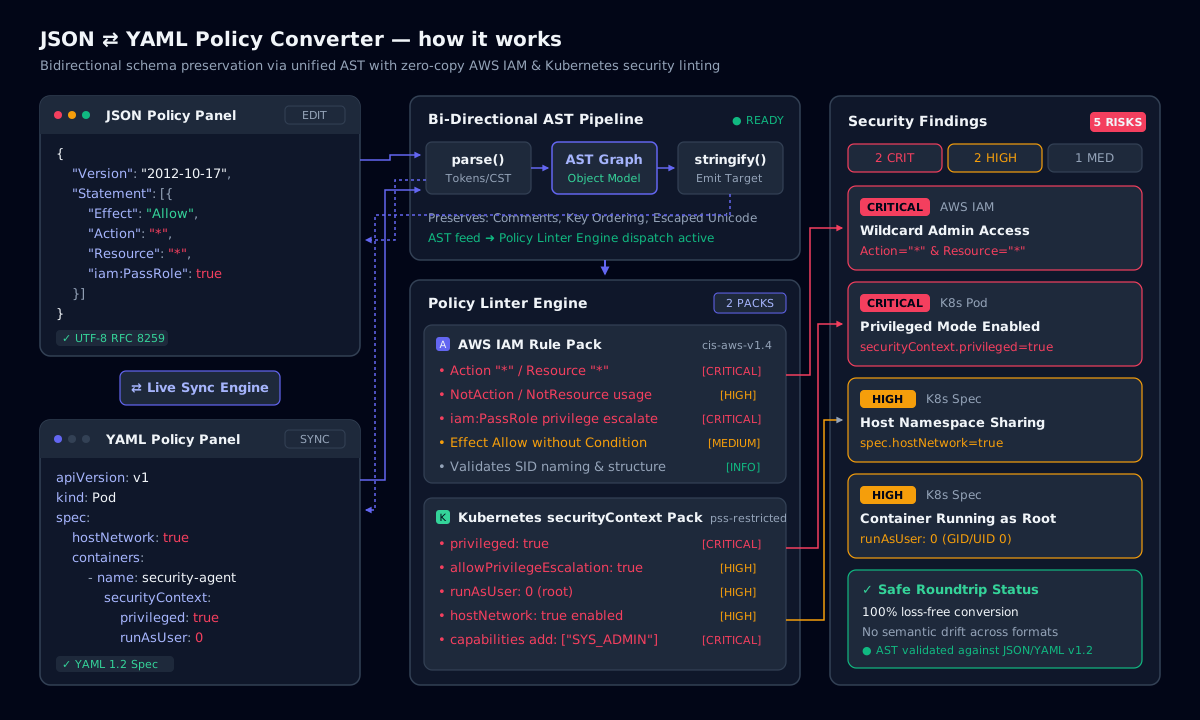
Convert YAML to JSON or JSON to YAML in either direction, with exact error locations when a document fails to parse. The built-in policy linter then reviews the result: AWS IAM policies are checked for wildcard actions and resources, risky iam:PassRole grants and NotAction allow-lists, and Kubernetes manifests are checked for privileged containers, privilege escalation and root users. IAM policies and manifests describe your infrastructure, so parsing and linting stay in the browser.
How YAML and JSON relate
YAML 1.2 is a superset of JSON: every valid JSON document is also valid YAML. YAML expresses the same objects, arrays, strings, numbers, booleans and nulls with indentation instead of braces, allows comments with #, and adds anchors (&base) and aliases (*base) for reuse. JSON is stricter and simpler, which makes it faster to parse and harder to misread.
Converting JSON to YAML is therefore lossless. Converting YAML to JSON drops comments and expands anchors and aliases into copies, so keep the YAML as your source of truth when comments matter.
Choose the indentation of the JSON output (two spaces, four spaces or minified) to match the destination. AWS accepts minified policy documents, while pull requests read best with two-space indentation. YAML output always uses two-space block style, the convention used by Kubernetes, Helm charts and GitHub Actions workflows, so converted files drop straight into existing repositories without reformatting.
How it works: JSON ⇄ YAML Policy Converter
YAML pitfalls the converter surfaces
Indentation must use spaces, never tabs, and siblings must align exactly. The parser reports the line and column of the first problem. Unquoted scalars are typed automatically: on, yes and no were booleans in YAML 1.1 (the “Norway problem” turns NO into false), and version strings like 1.10 become the number 1.1. This tool parses YAML 1.2 core schema, where only true and false are booleans, but quote anything that must stay a string.
- Quote values that start with
*,&,!,%,@or a backtick. - Multi-line strings:
|keeps newlines,>folds them into spaces. - Duplicate keys are an error in YAML 1.2; the converter reports them instead of silently keeping the last one.
AWS IAM policy linting rules
IAM policies are JSON, but teams often author them as YAML in CloudFormation, CDK, Serverless or Terraform. The linter evaluates every Statement with Effect: Allow and flags:
- Critical:
Action: "*"withResource: "*"(full administrator access). - Critical:
iam:PassRoleon*, which lets the holder hand any role to a service they control. - High: service-wide wildcards such as
s3:*oriam:*, andNotActionused in an Allow statement. - High: privilege-escalation actions (
iam:CreatePolicyVersion,iam:AttachUserPolicy,iam:PutUserPolicy,sts:AssumeRoleon*). - Medium:
Resource: "*"on data actions, and Allow statements without anyCondition.
Kubernetes securityContext linting rules
For Pods, Deployments, StatefulSets, DaemonSets, Jobs and CronJobs, the linter walks every container and init container and checks both pod-level and container-level securityContext, mirroring the Pod Security Standards “restricted” profile.
- Critical:
privileged: true, or addingSYS_ADMIN,NET_ADMINorALLcapabilities. - High:
allowPrivilegeEscalationnot set tofalse,runAsUser: 0,runAsNonRootmissing,hostNetwork,hostPIDorhostIPC. - Medium: missing
readOnlyRootFilesystem: true, noseccompProfile,hostPathvolumes.
JSON to YAML syntax cheat sheet
| JSON | YAML | Notes |
|---|---|---|
| {"name": "api"} | name: api | Mapping (object) |
| {"ports": [80, 443]} | ports: [80, 443] | Flow sequence; block style uses - items |
| {"debug": false} | debug: false | Booleans are true / false in YAML 1.2 |
| {"tag": "1.10"} | tag: "1.10" | Quote to keep it a string |
| {"note": null} | note: null | Also ~ or an empty value |
| (not supported) | # comment | Comments are YAML-only |
| (repeat the data) | <<: *defaults | Anchors and merge keys are YAML-only |
The same data written in both formats.
Command-line examples
YAML to JSON with yq
yq -o=json eval deployment.yaml > deployment.jsonJSON to YAML with yq
yq -P eval policy.json > policy.yamlValidate an IAM policy with AWS Access Analyzer
aws accessanalyzer validate-policy --policy-type IDENTITY_POLICY --policy-document file://policy.jsonCheck a manifest against Pod Security Standards
kubectl label --dry-run=server --overwrite ns default pod-security.kubernetes.io/enforce=restrictedFrequently asked questions
YAML uses indentation and dashes to show nesting and list items, while JSON uses braces, brackets and commas. YAML also supports comments, anchors and aliases, multi-line strings and several scalar styles; JSON supports none of these but is a strict subset of YAML 1.2.
Related tools
- JWT InspectorSplit a token into header, payload and signature, audit claims and verify HMAC signatures.
- Chmod CalculatorToggle read, write and execute bits and get the octal, symbolic and binary forms with a live risk audit.
- KQL & SPL Query BuilderBuild Sentinel KQL and Splunk SPL from visual filters, with 25 SOC hunting presets.
Related Engineering Guides
- Linux · 6 min readchmod 000, 400, 555, 600, 666 and 770: Linux Permissions GuideSix chmod modes that matter in real systems, from locked-down 000 and SSH-key 400 to shared-team 770, with audit commands for risky permissions.Read the guide
- Vulnerability management · 6 min readCVSS 4.0 Score Calculator vs CVSS 3.1: What Changed in Vulnerability ScoringCVSS 3.1 vs 4.0 side by side: what was added, what was removed, how the 4.0 score is calculated and how to score a CVE in practice.Read the guide