
This chmod calculator converts Linux file permissions between octal (755), symbolic (rwxr-xr-x) and binary form while you click. It is a linux permissions calculator, a unix permissions calculator and a security audit in one: every change is scored for risk, so a careless chmod 777 is flagged before it reaches a production server. Nothing you type leaves the browser.
Symbolic mode grammar: who, operator, permission
Running chmod x script.sh fails with chmod: invalid mode: ‘x’. A symbolic mode always has up to three parts: who (u owner, g group, o others, a all), an operator (+ add, - remove, = set exactly) and the permissions (r, w, x, X, s, t). The operator is mandatory; the who part is optional.
When you leave out the who part, as in chmod +x, the change applies to all three classes except bits blocked by your umask. With the common umask 022 that still adds execute for everyone, giving rwxr-xr-x on a rw-r--r-- file. Write a+x when you want the result to ignore the umask.
Capital X is the conditional execute bit: it adds execute only to directories and to files that already have execute for someone. chmod -R u=rwX,go=rX dir therefore makes directories traversable without marking every data file as a program.
Several clauses can be combined with commas, as in chmod u+x,g-w,o= file, and they are applied left to right. The calculator above shows the octal and ls -l result of each expression before you run it.
chmod u+x file: execute for the owner only (rwxr--r--from 644).chmod ug+x file: execute for owner and group (rwxr-xr--).chmod a+x file: execute for everyone, regardless of umask.chmod o=x file: others get execute only, nothing else.chmod -R a+X dir: execute on directories, and on files that are already executable.
chmod x explained
chmod +x script.sh results in mode 755, shown by ls -l as -rwxr-xr-x. In plain terms: owner: read, write, execute; group: read, execute; other: read, execute.
- Use it for: Shell scripts, compiled binaries and CLI tools you need to run directly.
- Avoid it for: Data files, uploads and documents — they never need the execute bit.
- Risk rating: Standard: no write access for others. World-readable: avoid for private keys, .env files and credentials.
How chmod permissions work
chmod stands for change mode. Every file and directory on a Linux or Unix system carries a mode: nine permission bits split into three triplets for the owner (user), the group, and others (everyone else). Each triplet answers three questions: can this class read the file, write to it, and execute it?
Octal notation compresses each triplet into one digit by adding weights: read = 4, write = 2, execute = 1. A digit of 7 is 4+2+1 (read, write, execute), 6 is read and write, 5 is read and execute, and 4 is read-only. That is why chmod 755 means the owner gets everything while group and others can read and execute but never modify.
For directories the bits mean something slightly different. Read lets you list names, write lets you create, rename or delete entries, and execute (the search bit) lets you traverse into the directory at all. A directory with r but no x is a common source of confusing “permission denied” errors.
How it works: Chmod Calculator
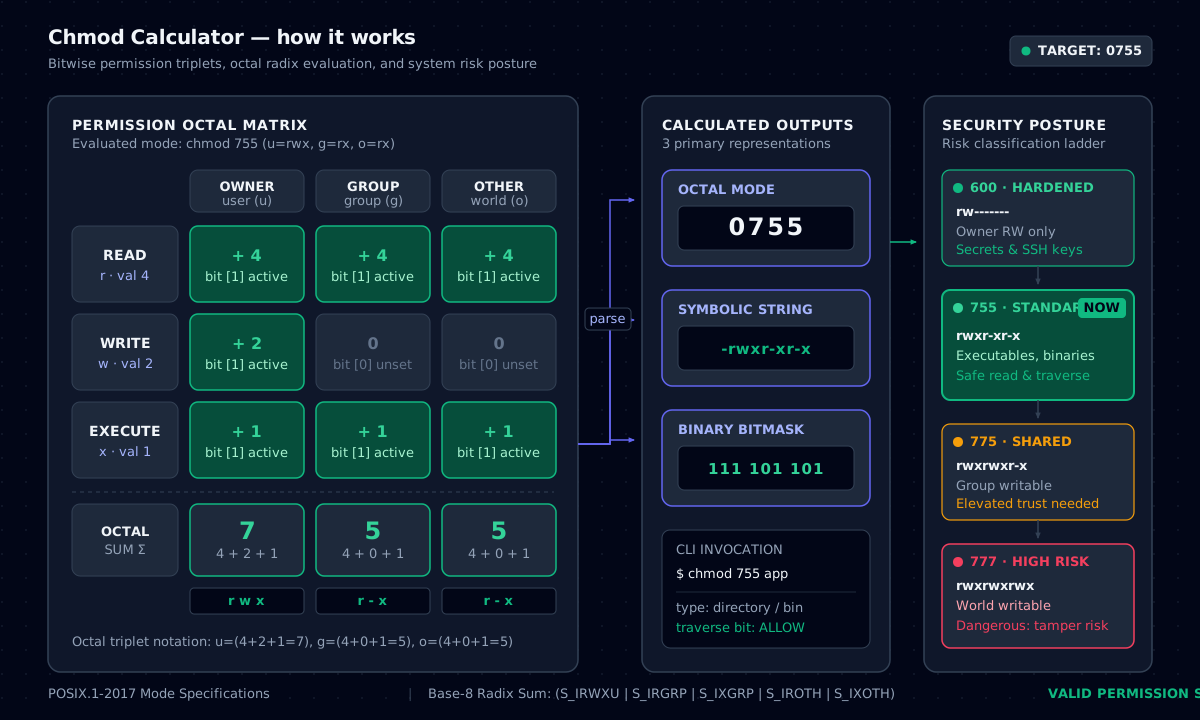
Common modes: 644, 755, 600 and 777
The 644 file permission (rw-r--r--) is the default for regular files: the owner can edit, everyone else can read. Web assets, configuration files and documentation normally use 644 permissions. chmod 755 is its counterpart for directories and executables.
chmod 600 restricts a file to its owner: nobody else can read it. Use it for SSH private keys, .env files, kubeconfig files and API tokens. OpenSSH refuses to use a private key that is readable by group or others, which is why chmod 600 ~/.ssh/id_ed25519 (or 400) fixes the “UNPROTECTED PRIVATE KEY FILE” warning.
chmod 777 grants read, write and execute to every account on the system. It is almost never the right fix. On a web server it lets any compromised process overwrite your code, and on shared hosts it lets other tenants plant files. The calculator marks 777, 666 and anything world-writable as high risk.
Symbolic mode: chmod +x, -x and u=rw
Symbolic mode edits permissions relative to what is already there. chmod +x deploy.sh adds execute for everyone (subject to the umask), chmod -x notes.txt removes it, and chmod u=rw,go=r file sets exact values per class. The letters are u (user/owner), g (group), o (others) and a (all).
Use the capital X with recursive changes: chmod -R u=rwX,go=rX dir gives execute only to directories and to files that already had it, so data files do not become executable by accident.
+adds bits,-removes bits,=sets bits exactly and clears the rest for that class.- Multiple clauses are comma-separated without spaces:
chmod u+x,g-w file. chmod a-wmakes a file read-only for everyone, including the owner.
From -rwxr-x--- back to octal
Paste a permission string such as -rwxr-x--- into the Symbolic field and the calculator works backwards: the matrix, octal value and command update immediately. -rwxr-x--- is 750: the owner has rwx (4+2+1 = 7), the group r-x (4+1 = 5) and others nothing (0). You can paste a whole ls -l line (drwxr-x---+ 2 root adm 4096 …) or chmod -rwxr-x---; the file type letter and the trailing + (ACL) or . (SELinux) markers are ignored.
As a chmod maker this works in both directions: tick boxes to build a mode, or paste what ls -l shows to find the number to reuse with chmod on another server.
Special bits: setuid, setgid and sticky
A fourth, leading octal digit controls special bits. 4 is setuid: the program runs with the file owner’s privileges (this is how passwd edits /etc/shadow). 2 is setgid: programs run with the group’s privileges, and new files inside a setgid directory inherit its group. 1 is the sticky bit: in a shared directory such as /tmp (1777), users can delete only their own files.
Setuid binaries owned by root are a classic privilege-escalation path. During a security review, list them with find / -perm -4000 -type f 2>/dev/null and compare against a known-good baseline.
chmod -R safely and when sudo is needed
chmod -R applies a mode to a directory and everything beneath it. Running chmod -R 755 on a tree makes every file executable, which is rarely what you want. Prefer two passes with find: one for directories (755) and one for files (644).
You need sudo only when you are not the file’s owner. The owner can always change a file’s mode; root can change any mode. Changing ownership itself is a separate command, chown.
chmod reference cheat sheet
| Octal | Symbolic | Owner / Group / Other | Typical use |
|---|---|---|---|
| 600 | rw------- | rw / – / – | SSH keys, .env, credentials |
| 400 | r-------- | r / – / – | AWS .pem keys, read-only secrets |
| 644 | rw-r--r-- | rw / r / r | Regular files, web assets |
| 664 | rw-rw-r-- | rw / rw / r | Group-edited documents |
| 700 | rwx------ | rwx / – / – | ~/.ssh, private directories |
| 750 | rwxr-x--- | rwx / rx / – | Service-group application dirs |
| 755 | rwxr-xr-x | rwx / rx / rx | Directories, scripts, binaries |
| 775 | rwxrwxr-x | rwx / rwx / rx | Shared team directories |
| 777 | rwxrwxrwx | rwx / rwx / rwx | Avoid: world-writable |
| 1777 | rwxrwxrwt | sticky + all | /tmp and shared drop folders |
| 4755 | rwsr-xr-x | setuid + 755 | passwd, sudo (audit carefully) |
Octal, symbolic and typical use for the permissions you will set most often.
Command-line examples
Inspect current permissions
stat -c "%a %A %U:%G %n" ~/.ssh/*Prints octal, symbolic, owner and name.
Fix a web root the safe way
find /var/www/app -type d -exec chmod 755 {} +
find /var/www/app -type f -exec chmod 644 {} +
Lock down an SSH key
chmod 700 ~/.ssh && chmod 600 ~/.ssh/id_ed25519Find world-writable files
find / -xdev -type f -perm -0002 -ls 2>/dev/nullFrequently asked questions
A symbolic mode needs an operator. Use chmod +x (add), chmod -x (remove) or chmod =x (set exactly). The who letters u, g, o and a are optional and go before the operator.
Related tools
- CIDR Subnet SplitterNetwork, broadcast, host range and wildcard for any IPv4 block, with one-click split and merge.
- Cron VisualizerTranslate five-field cron expressions to plain English and preview the next runs in UTC and local time.
- JSON ⇄ YAML Policy ConverterConvert between JSON and YAML and lint AWS IAM policies and Kubernetes securityContext.