
Build Microsoft Sentinel KQL and Splunk SPL queries side by side from visual filter rows, or start from one of 25 SOC hunting presets covering brute force, encoded PowerShell, LSASS access, new admin accounts and more. The Rosetta Stone table maps every common Splunk command to its KQL equivalent, which is useful when you are migrating detections or working in both SIEMs. Field names and values are never sent anywhere.
KQL query basics
Kusto Query Language (KQL) is the read-only query language behind Microsoft Sentinel, Defender XDR advanced hunting, Azure Monitor Log Analytics and Azure Data Explorer. A KQL query starts with a table and pipes rows through operators: SecurityEvent | where EventID == 4625 | summarize count() by Account.
The most useful operators are where (filter), project (choose columns), extend (computed columns), summarize (aggregate), join (combine tables), parse and extract (pull values from strings) and top / order by (sort). Always filter on TimeGenerated early; it is the cheapest filter and keeps queries inside quota.
==is case-sensitive;=~is case-insensitive.hasmatches whole terms and is much faster thancontains, which matches substrings.- KQL join defaults to
innerunique, which deduplicates the left side. Specifykind=innerwhen you need every match.
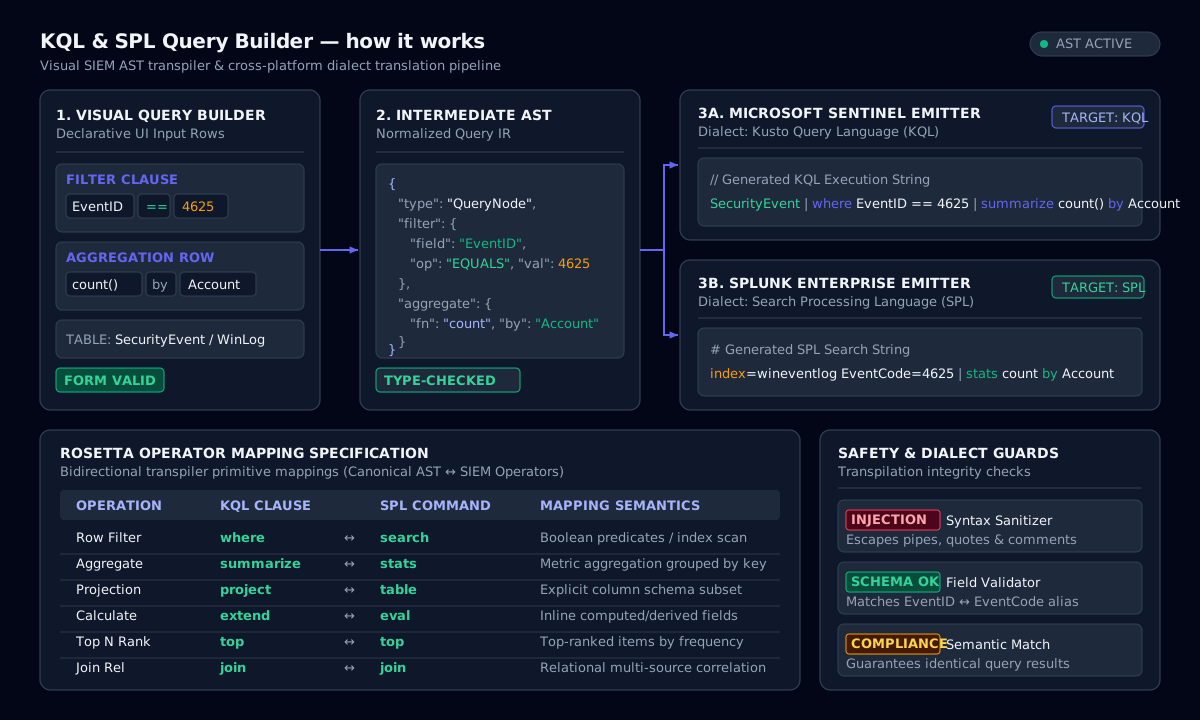
How it works: KQL & SPL Query Builder
Splunk SPL basics
The Splunk query language (SPL) starts with a search over indexed events, written as index=… sourcetype=… field=value, and pipes the results through commands: stats, eval, table, rex, where, dedup, timechart and lookup. The implicit search at the start is the fastest place to filter, because it uses the index.
Splunk regex extraction uses rex: | rex field=_raw "user=(?<user>\S+)" creates a user field. In Splunk regex, named groups use (?<name>…), and backslashes inside quotes must be escaped once more than in a raw pattern.
Translating detections between SPL and KQL
Most Splunk SPL detections translate one command at a time. stats count by user becomes summarize count() by user; eval becomes extend; table becomes project; rex becomes parse or extract(); earliest=-24h becomes where TimeGenerated > ago(24h). Field names usually differ more than syntax does. Windows logon events are EventCode in Splunk’s Windows TA but EventID in Sentinel’s SecurityEvent table.
The builder keeps one filter model and emits both dialects, so you can check that a translated detection still uses the same logic. Review the field mapping for your data sources before deploying.
Using the SOC hunting presets
Each preset is a hunting starting point, not a production analytic rule. Run it over a recent window, baseline what is normal for your environment, then add allow-lists and thresholds before alerting on it. The presets are mapped to MITRE ATT&CK techniques so you can track coverage. They are also concrete Splunk query examples and KQL query examples for training new analysts.
SPL to KQL Rosetta Stone
| Splunk SPL | KQL | Purpose |
|---|---|---|
| search / implicit | where | Filter rows |
| stats count by x | summarize count() by x | Aggregate |
| eval y=… | extend y = … | Computed column |
| table a, b | project a, b | Choose columns |
| rename a AS b | project-rename b = a | Rename a column |
| rex "(?<u>\S+)" | parse / extract() | Regex field extraction |
| dedup x | summarize arg_max(TimeGenerated, *) by x | Latest row per key |
| sort - count | order by count desc | Sort |
| head 10 | take 10 | Limit rows |
| top 10 x | top 10 by count_ | Most frequent values |
| timechart span=1h count | summarize count() by bin(TimeGenerated, 1h) | Time series |
| earliest=-24h | where TimeGenerated > ago(24h) | Time range |
| join type=inner x | join kind=inner (…) on x | Join |
| stats dc(x) by y | summarize dcount(x) by y | KQL summarize: distinct count |
| join type=left x | join kind=leftouter (…) on x | Kusto join: keep unmatched left rows |
| NOT [search … | fields x] | join kind=leftanti (…) on x | Kusto join: left rows with no match |
| x="*text*" | where x has "text" / contains | KQL contains (has is faster, whole terms) |
| regex x="pat" | where x matches regex @"pat" | KQL regex filter |
| rex field=x "(?<u>\S+)" | extend u = extract(@"(\S+)", 1, x) | KQL regex extract |
| (Loki) | regexp `(?P<u>\S+)` | parse / extract() | LogQL regex extract → label |
| lookup file.csv x | join (_GetWatchlist("x")) on x | Enrichment |
Equivalent commands in Splunk SPL and Microsoft Sentinel KQL.
Command-line examples
Run KQL from the Azure CLI
az monitor log-analytics query -w $WORKSPACE_ID --analytics-query "SecurityEvent | where EventID == 4625 | take 10"Run SPL from the Splunk CLI
splunk search "index=wineventlog EventCode=4625 | stats count by Account_Name" -earliest_time -24hRun SPL over the REST API
curl -k -u admin https://splunk:8089/services/search/jobs/export -d search="search index=main | head 5" -d output_mode=jsonFrequently asked questions
KQL (Kusto Query Language) is the language security analysts use to hunt and write detections in Microsoft Sentinel and Microsoft Defender XDR. It queries security logs such as sign-ins, process creation, network connections and alerts at scale.
Related tools
- IOC ExtractorExtract and defang indicators of compromise from reports and logs, then export CSV or JSON.
- Log DeobfuscatorDecode Base64, PowerShell, hex, URL and gzip with auto-detect, plus text-to-binary, dec-to-hex and an ASCII table.
- CVSS CalculatorScore vulnerabilities with CVSS v4.0 or v3.1, parse vector strings and see severity at a glance.
Related Engineering Guides
- Networking · 6 min read/30 vs /29 vs /28 vs /27 Subnet Masks: Host Bits ExplainedMasks, host bits and usable hosts for /25 through /30, plus the exam question: how many host bits does 255.255.255.224 leave?Read the guide
- Networking · 7 min readPrivate IP Ranges (RFC 1918) and Subnet Mask to CIDR: A Practical GuideThe three RFC 1918 blocks, why 255.255.255.0 is a /24, and how to size and split /16, /22, /23 and /24 networks without overlaps.Read the guide
- Linux · 6 min readCrontab Every 5 Minutes, Every 15 Minutes and Every 4 Hours (plus systemd Timers)Copy-ready crontab lines for every 5 and 15 minutes, hourly and every 4 hours, the matching systemd timers, and the mistakes that make cron jobs fail.Read the guide