Linux
chmod 000, 400, 555, 600, 666 and 770: Linux Permissions Guide
What chmod 000, 400, 555, 600, 666 and 770 do, when to use each mode, and why 777 is a risk. Octal to symbolic tables, SSH key fixes and audit commands.
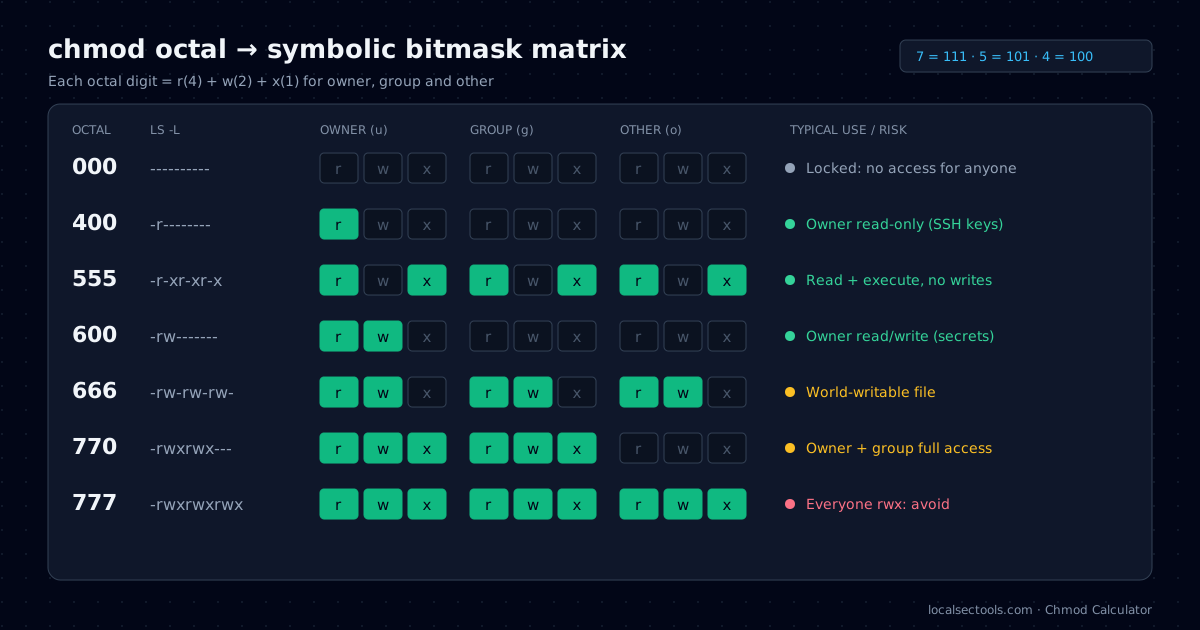
Each chmod mode is three octal digits: one for the owner, one for the group and one for everyone else. chmod 600 gives the owner read and write and nobody else anything. chmod 000 removes every permission. The other modes in this guide sit between those two extremes.
I use these six modes almost every week on Linux servers, and each one solves a specific problem. Below you will find what each mode means, where it belongs, and the one-line commands to find risky files. To try any mode as you read, toggle the bits in the chmod calculator.
How do chmod octal numbers work?
Each digit is the sum of read (4), write (2) and execute (1). The three digits apply to owner, group and other, in that order.
| Digit | Binary | Symbolic | Meaning |
|---|---|---|---|
| 0 | 000 | --- | no access |
| 4 | 100 | r-- | read only |
| 5 | 101 | r-x | read and execute |
| 6 | 110 | rw- | read and write |
| 7 | 111 | rwx | read, write and execute |
digit = 4·r + 2·w + 1·x e.g. rw- = 4 + 2 + 0 = 6, r-x = 4 + 0 + 1 = 5
On a directory the bits mean something slightly different. Read lists the names, write creates and deletes entries, and execute lets you enter the directory and reach files inside it.
What does chmod 000 do?
chmod 000 sets ---------- and removes every permission for owner, group and others. Only root can still read the file, and the owner can still change the mode back.
Use it to quarantine a suspicious script during an investigation without deleting evidence. The file stays in place with its timestamps, but normal users cannot run or read it.
Do not treat chmod 000 as a security boundary. Root bypasses file permissions, and the owner can run chmod 600 to undo it. See the chmod 000 page for the full bit breakdown.
What does chmod 400 do?
chmod 400 gives the owner read-only access (r--------) and nobody else any access. It is the standard mode for SSH private keys and AWS .pem key files.
OpenSSH refuses a private key that others can read. You will see WARNING: UNPROTECTED PRIVATE KEY FILE! and the login fails. Setting the key to 400 or 600 fixes it.
chmod 400 ~/.ssh/my-server.pem
chmod 700 ~/.ssh
ssh -i ~/.ssh/my-server.pem ubuntu@203.0.113.10
Choose 400 when the file should never change, and 600 when a tool must rewrite it. The chmod 400 preset shows the symbolic and binary forms.
What does chmod 555 do?
chmod 555 gives everyone read and execute (r-xr-xr-x) and removes write access for all users, including the owner.
On a script, 555 lets anyone run it while stopping accidental edits. On a directory, nobody except root can create, rename or delete files inside it.
This is useful for shared tool directories and for read-only content in containers. The owner can still restore write access with chmod u+w. Explore it on the chmod 555 page.
What does chmod 600 (mode 600) mean?
chmod 600 gives the owner read and write (rw-------) and nobody else any access. It is the right mode for secrets that a program must update.
Typical files are ~/.ssh/id_ed25519, .env files with API keys, ~/.netrc, and ~/.pgpass. PostgreSQL ignores a .pgpass file that is more permissive than 0600.
Configuration tools write it as "mode 600". In Ansible the parameter is mode: '0600'; quote it, or YAML reads the number in decimal. Open the chmod 600 preset to compare it with 640 and 644.
chmod 600 .env

# Ansible task
- name: Install API secrets
  ansible.builtin.copy:
    src: app.env
    dest: /opt/app/.env
    owner: app
    mode: '0600'
What does chmod 666 do?
chmod 666 gives every user read and write (rw-rw-rw-). The file is world-writable, so any local account can change it.
Device nodes such as /dev/null are 666 by design. Regular files almost never should be. A world-writable config or script lets any compromised account change what a privileged process reads or runs.
New files start from 666 and the umask removes bits. With the common umask 022, new files become 644. See the chmod 666 page for the audit findings.
What does permission 770 mean?
Permission 770 (rwxrwx---) gives the owner and the group full access and blocks everyone else. It suits shared team directories.
Pair 770 with the setgid bit on directories so new files inherit the group. Without it, each file takes the creator's primary group and teammates lose access.
sudo groupadd secops
sudo mkdir -p /srv/cases
sudo chown root:secops /srv/cases
sudo chmod 2770 /srv/cases   # 2 = setgid, 770 = rwxrwx---
The permission 770 preset explains each triplet, and the matrix diagram above compares it with 777.
Why should you avoid chmod 777?
chmod 777 lets every user read, write and execute the file. Any local account or compromised service can then replace its contents.
Web servers are the classic case. A 777 upload directory lets an attacker who gains any foothold drop a web shell that the server then runs. Use 755 for directories and 644 for files, and grant write access to the service user only.
The chmod 777 page flags this mode as critical and suggests safer alternatives.
How do you find risky permissions on a server?
Use find with -perm to list world-writable files and directories, and stat to print each file's octal mode.
# World-writable regular files (skips /proc and /sys)
find / -xdev -type f -perm -0002 2>/dev/null

# World-writable directories without the sticky bit
find / -xdev -type d -perm -0002 ! -perm -1000 2>/dev/null

# Octal mode and name
stat -c '%a %n' ~/.ssh/*| Mode | ls -l | Typical use | Risk |
|---|---|---|---|
| 000 | ---------- | Quarantine a file | Low |
| 400 | -r-------- | SSH and .pem keys | Low |
| 555 | -r-xr-xr-x | Read-only tools | Low |
| 600 | -rw------- | Secrets, .env | Low |
| 666 | -rw-rw-rw- | Device nodes only | High |
| 770 | -rwxrwx--- | Team directories | Medium |
| 777 | -rwxrwxrwx | Avoid | Critical |
If a find result shows an encoded or obfuscated script, decode it safely with the Log De-obfuscator before you open it.
Should you use octal or symbolic chmod?
Use octal when you want to set an exact final mode, such as 600. Use symbolic mode, such as u+x, when you want to change one bit and leave the rest alone.
Octal replaces the whole mode in one step, so the result is predictable. chmod 640 app.conf always ends with rw-r-----, whatever the file had before.
Symbolic mode edits the current permissions. chmod g-w,o= report.csv removes write from the group and clears every bit for others. It is safer inside scripts that run on files with different starting modes.
| Goal | Octal | Symbolic |
|---|---|---|
| Owner-only secret | chmod 600 .env | chmod u=rw,go= .env |
| Make a script runnable | chmod 755 run.sh | chmod +x run.sh |
| Read-only for everyone | chmod 444 notes.txt | chmod a=r notes.txt |
| Shared team directory | chmod 770 /srv/cases | chmod ug=rwx,o= /srv/cases |
How does umask decide default permissions?
New files start at 666 and new directories at 777, and the umask removes bits from those values. A umask of 022 gives files 644 and directories 755.
| umask | New files | New directories | Typical use |
|---|---|---|---|
| 022 | 644 | 755 | Most Linux distributions |
| 027 | 640 | 750 | Hardened servers |
| 077 | 600 | 700 | Private home directories |
Check your current value with umask, and set it for a service with UMask=0027 in its systemd unit. A tight umask means fewer files need a chmod afterwards, which removes a whole class of mistakes.
Frequently asked questions
chmod 000 removes read, write and execute for owner, group and others. Root can still access the file and the owner can change the mode back.
Try it in your browser
- Chmod CalculatorToggle read, write and execute bits and get the octal, symbolic and binary forms with a live risk audit.
- Log DeobfuscatorDecode Base64, PowerShell, hex, URL and gzip with auto-detect, plus text-to-binary, dec-to-hex and an ASCII table.
- JSON ⇄ YAML Policy ConverterConvert between JSON and YAML and lint AWS IAM policies and Kubernetes securityContext.
About the author: Asad Ali
IT Support Engineer and SOC analyst · Microsoft SC-200 & ISC2 CC certified
Asad Ali is an IT Support Engineer and SOC analyst with a Computer Science degree from UET Lahore. He holds the Microsoft SC-200 Security Operations Analyst and ISC2 Certified in Cybersecurity (CC) certifications, works on threat detection, network analysis and Linux administration, and builds and maintains every tool on LocalSecTools.
- Microsoft Certified: Security Operations Analyst (SC-200)
- ISC2 Certified in Cybersecurity (CC)
Every guide is written and technically reviewed by Asad Ali, and the commands and numbers are checked against the LocalSecTools calculators. Read more about his work at asadali.tech.