
This crontab generator and cron expression translator turns a five-field schedule such as */15 9-17 * * 1-5 into plain English and lists the next seven run times in both UTC and your local time zone. Use it as a cron expression generator when writing a new job, or as a crontab calculator to check what an existing line in production actually does.
Breaking down */15 * * * *
- Minute
*/15: every 15 minutes, starting at 0 - Hour
*: every hour (0–23) - Day
*: every day (1–31) - Month
*: every month (1–12) - Weekday
*: every weekday (0–6)
Together they read as Every 15 minutes, which runs 96 times a day. The same expression works in Kubernetes CronJobs and GitHub Actions schedule, which evaluate it in UTC.
The five fields of a cron expression
A standard cron expression has five space-separated fields, read left to right: minute (0–59), hour (0–23), day of month (1–31), month (1–12 or JAN–DEC) and day of week (0–6 or SUN–SAT, where 7 is also Sunday). A line in a crontab file adds the command after these five fields.
Each field accepts a value (5), a list (1,15,30), a range (9-17), a step (*/10) or a combination such as 0-30/5. An asterisk means “every value”. The visualizer highlights the matching field pill as you hover, so you can see which part of the cron schedule drives each part of the description.
How it works: Cron Visualizer
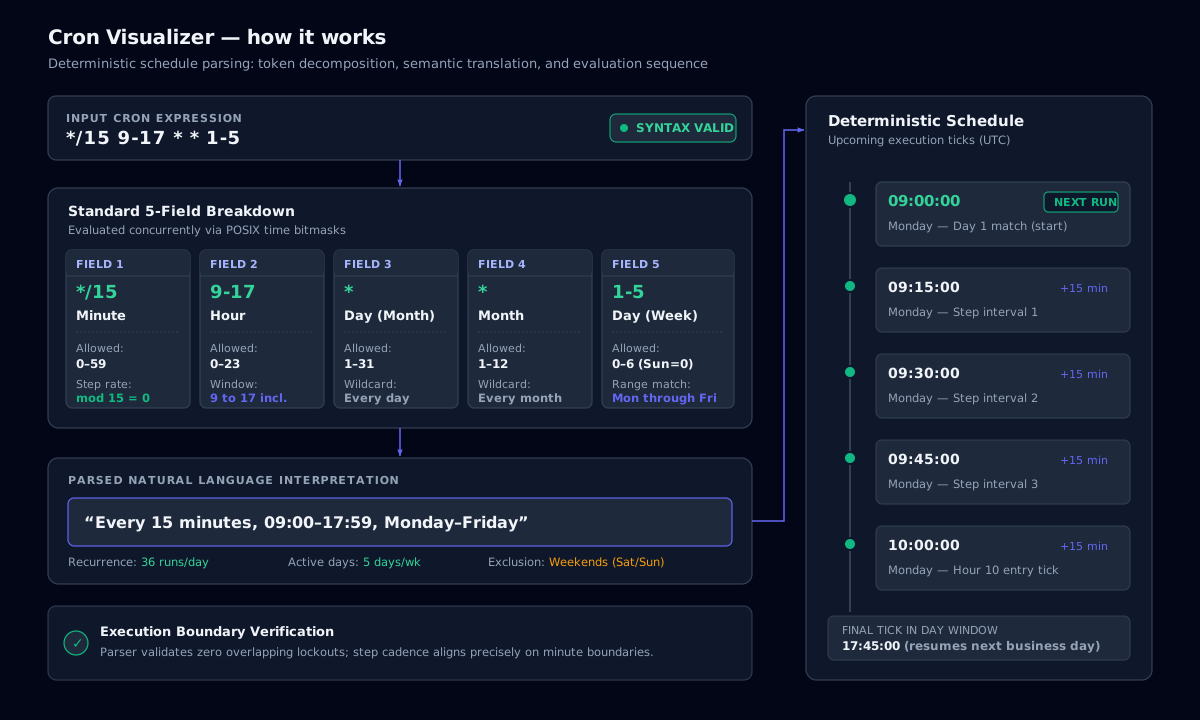
The day-of-month and day-of-week trap
When both the day-of-month and day-of-week fields are restricted, Vixie cron (the cron on Debian, Ubuntu, RHEL and macOS) runs the job when either matches, not when both match. 0 9 13 * 5 therefore runs on the 13th of every month and on every Friday, not only on Friday the 13th.
If you need “first Monday of the month”, schedule 0 9 1-7 * * and guard the command with a weekday test: [ "$(date +\%u)" = 1 ] && /path/to/job. Note the escaped percent sign: cron treats a bare % as a newline.
Time zones, daylight saving and missed runs
Cron evaluates schedules in the system time zone of the server, which on most cloud images is UTC. The next-run timeline shows both UTC and your browser’s local time so you can spot the difference before it becomes an incident.
Around daylight-saving transitions, jobs scheduled between 01:00 and 03:00 local time can run twice or not at all. Schedule critical jobs in UTC, or outside that window. Cron also does not catch up on runs missed while the machine was off; use anacron or a systemd timer with Persistent=true if you need that.
Macros, Kubernetes CronJobs and other dialects
Most crons accept shortcuts: @hourly (0 * * * *), @daily or @midnight (0 0 * * *), @weekly (0 0 * * 0), @monthly, @yearly and @reboot, which runs once at startup.
Kubernetes CronJob, GitHub Actions schedule and most CI systems use the same five-field syntax, always in UTC unless you set timeZone. Quartz (Java) and AWS EventBridge use six or seven fields with a seconds or year field and a ? placeholder, so paste only the standard five fields here.
- If you have used crontab guru, the syntax here is identical; this tool adds local and UTC timelines side by side.
- Avoid
* * * * *for heavy jobs: one run per minute adds up to 1,440 runs a day. - Spread load by offsetting minutes (
7,37 * * * *) instead of starting every job at minute 0.
Cron schedule cheat sheet
| Expression | Meaning | Runs per day |
|---|---|---|
| * * * * * | Every minute | 1,440 |
| */5 * * * * | Every 5 minutes | 288 |
| */15 * * * * | Every 15 minutes | 96 |
| */30 * * * * | Every 30 minutes | 48 |
| 0 * * * * | Every hour, on the hour | 24 |
| 0 */4 * * * | Every 4 hours (00, 04, 08…) | 6 |
| 0 */6 * * * | Every 6 hours | 4 |
| 0 0 * * * | Every day at midnight | 1 |
| 0 9 * * 1-5 | Weekdays at 09:00 | 1 (Mon–Fri) |
| 0 0 * * 0 | Weekly, Sunday at midnight | 1 per week |
| 0 0 1 * * | Monthly, on the 1st | 1 per month |
Copy-ready cron expressions for the schedules people search for most.
Command-line examples
Edit your crontab
crontab -eList your cron jobs
crontab -lAdd -u username (as root) to list another user’s jobs.
List system-wide cron jobs
ls /etc/cron.d /etc/cron.daily /etc/cron.hourly && cat /etc/crontabLog output from a job
*/5 * * * * /opt/backup.sh >> /var/log/backup.log 2>&1Frequently asked questions
Use */15 * * * *. It reads as “Every 15 minutes” and runs 96 times a day.
Related tools
- Chmod CalculatorToggle read, write and execute bits and get the octal, symbolic and binary forms with a live risk audit.
- Log DeobfuscatorDecode Base64, PowerShell, hex, URL and gzip with auto-detect, plus text-to-binary, dec-to-hex and an ASCII table.
- KQL & SPL Query BuilderBuild Sentinel KQL and Splunk SPL from visual filters, with 25 SOC hunting presets.