
This DMARC generator and SPF record builder produces valid DNS TXT records from a few choices, then explains what each tag does. The diagnostic tab takes the error your scanner or mail provider reported, such as “No DMARC record found” or “DMARC quarantine/reject policy not enabled”, and gives you the record and steps that fix it. Records are assembled locally; no DNS queries are made from this page.
How SPF, DKIM and DMARC fit together
SPF (Sender Policy Framework) is a TXT record on your domain that lists the servers allowed to send mail for it. DKIM signs each message with a private key; receivers fetch the public key from selector._domainkey.yourdomain. DMARC ties them together: it tells receivers what to do when a message fails, and where to send reports.
DMARC passes only when SPF or DKIM passes and is aligned with the visible From domain. Alignment is why a message can pass SPF (for the bounce domain of your email platform) yet still fail DMARC. For DMARC email security, DKIM alignment is the more robust of the two because it survives forwarding.
How it works: SPF & DMARC Generator
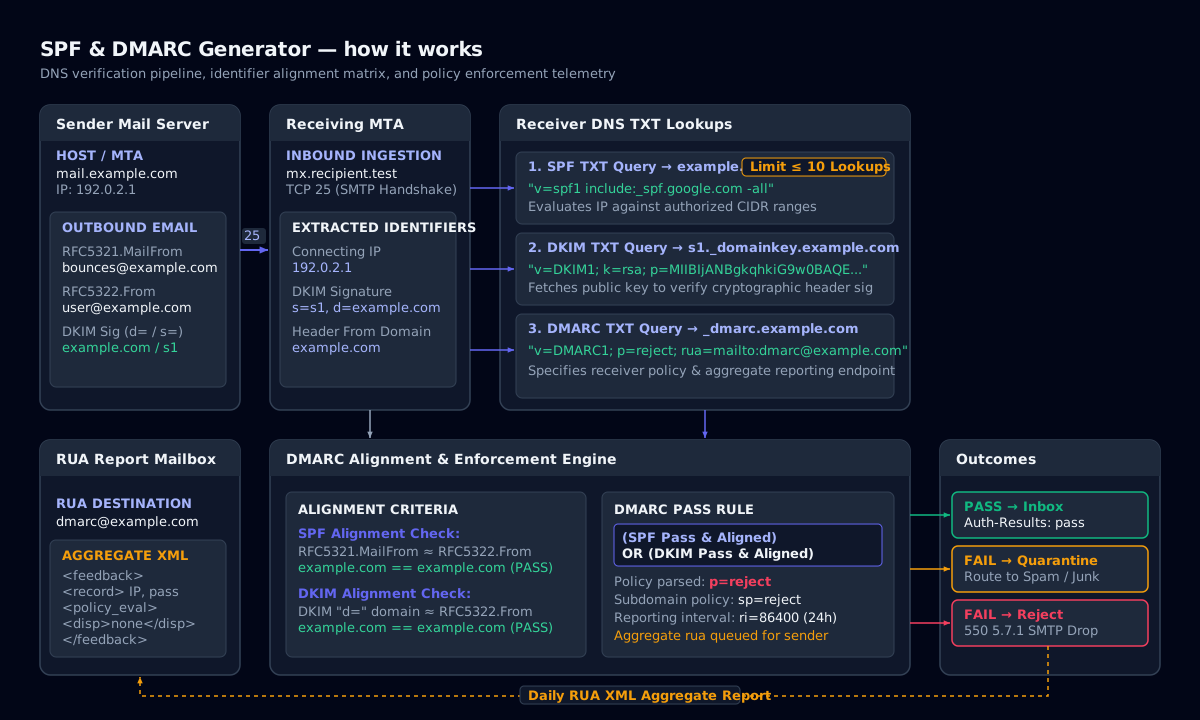
SPF syntax and the 10-lookup limit
An SPF record starts with v=spf1, lists mechanisms and ends with an all qualifier. include:_spf.google.com authorises Google Workspace (the standard Google SPF record), ip4:203.0.113.0/24 authorises a range, mx authorises your MX hosts, and -all tells receivers to reject everything else. ~all (softfail) is a common, gentler default while you inventory senders.
SPF evaluation may trigger at most 10 DNS lookups. Every include, a, mx, ptr, exists and redirect counts, including nested includes. Exceed it and SPF returns permerror, which DMARC treats as a fail. The builder counts lookups as you add providers.
- Publish exactly one SPF record per domain; two
v=spf1records are a permerror. - Do not use
+all; it authorises the whole internet to send as you. - Domains that never send mail should publish
v=spf1 -all.
Choosing a DMARC policy: none, quarantine, reject
Start with p=none and a rua address so you receive aggregate reports without affecting delivery. Once every legitimate sender passes, move to p=quarantine (failures go to spam), optionally ramping with pct=25, 50 and 100, then to p=reject. A DMARC policy of reject is what actually stops exact-domain spoofing, and it is what Google and Yahoo bulk-sender rules and most scanners look for.
The sp tag sets the policy for subdomains, adkim and aspf set alignment mode (r relaxed or s strict), and fo=1 requests failure reports for any failing mechanism.
Reading DMARC aggregate reports
Receivers send daily aggregate (rua) reports as gzipped XML. Each <record> gives a source IP, a message count, the SPF and DKIM results and the disposition applied. Group rows by source: known platforms that fail need SPF includes or DKIM keys; unknown IPs that fail are spoofing attempts your policy should block.
At volume, a dedicated DMARC report analyzer or DMARC service saves time. Commercial DMARC software such as PowerDMARC parses reports into dashboards and alerts on new senders. For a single domain, unzip the XML and scan the source_ip, count, dkim and spf fields; the Log Deobfuscator on this site can gunzip a Base64-encoded report locally.
Troubleshooting: “No SPF record found”
Scanners report no SPF record found when a lookup of TXT records at the root of your domain returns nothing that starts with v=spf1. The usual causes are a record published on www or _spf instead of the root (@), a legacy SPF-type DNS record instead of TXT, a typo such as v=spf or v= spf1, or a change that has not propagated yet.
Check what the world sees with nslookup -type=TXT example.com (or dig +short TXT example.com). Exactly one line should start with v=spf1. If you see none, publish the record from the Build tab as a TXT record on the root host. If you see two, merge them: multiple SPF records are a PermError.
How to fix an SPF record
Start from the failing message: the Authentication-Results header names the sending IP and the SPF result. Add the include that the sending platform documents (for example include:_spf.google.com or include:spf.protection.outlook.com), keep a single v=spf1 record, stay at 10 DNS lookups or fewer, and end with ~all while testing, then -all once DMARC reports show every legitimate source passing.
Online SPF query tools such as the Kitterman SPF validator and the MXToolbox SPF record check run live DNS lookups and expand nested includes. This builder works offline and never sends your domain anywhere, so use it to compose and lint the record, then confirm the published result with nslookup or one of those checkers.
SPF and DMARC tag reference
| Tag | Record | Meaning |
|---|---|---|
| include:domain | SPF | Authorise another domain’s SPF senders (1 lookup) |
| ip4: / ip6: | SPF | Authorise an address or CIDR range (0 lookups) |
| mx / a | SPF | Authorise the domain’s MX or A hosts (1 lookup each) |
| -all / ~all | SPF | Fail / softfail everything not listed |
| p= | DMARC | Policy: none, quarantine or reject |
| sp= | DMARC | Policy for subdomains |
| pct= | DMARC | Percentage of failing mail the policy applies to |
| rua=mailto: | DMARC | Aggregate report destination |
| ruf=mailto: | DMARC | Forensic (failure) report destination |
| adkim= / aspf= | DMARC | Alignment mode: r relaxed, s strict |
| fo= | DMARC | Failure reporting options (0, 1, d, s) |
Tags you can combine in v=spf1 and v=DMARC1 records.
Command-line examples
Check a published DMARC record
dig +short TXT _dmarc.example.comCheck SPF
dig +short TXT example.com | grep spf1Check a DKIM key
dig +short TXT google._domainkey.example.comWindows equivalent
Resolve-DnsName -Type TXT _dmarc.example.comFrequently asked questions
Make sure SPF and DKIM pass for all your senders, then publish a TXT record at _dmarc.yourdomain with a value such as v=DMARC1; p=none; rua=mailto:dmarc@yourdomain. Monitor reports for two to four weeks, fix failing sources, then raise the policy to quarantine and finally reject.
Related tools
- Log DeobfuscatorDecode Base64, PowerShell, hex, URL and gzip with auto-detect, plus text-to-binary, dec-to-hex and an ASCII table.
- IOC ExtractorExtract and defang indicators of compromise from reports and logs, then export CSV or JSON.
- CVSS CalculatorScore vulnerabilities with CVSS v4.0 or v3.1, parse vector strings and see severity at a glance.