
This JWT decoder splits a JSON Web Token into its colour-coded header, payload and signature, converts exp, iat and nbf into readable dates with a live expiry countdown, and audits the token for weaknesses such as alg: none. Paste a bearer token straight from an Authorization header. Signature verification for HS256, HS384 and HS512 runs locally through WebCrypto. Unlike pasting a production token into a JWT decode online service, nothing here leaves your machine.
Anatomy of a JSON Web Token
A JWT is three Base64URL-encoded segments joined by dots: header.payload.signature. The header names the signing algorithm (alg) and often a key ID (kid). The payload carries claims: registered ones such as iss (issuer), sub (subject), aud (audience), exp (expiry), nbf (not before) and iat (issued at), plus any custom claims.
The signature is computed over the exact bytes base64url(header) + "." + base64url(payload). Changing a single character in either segment invalidates it. JWT decoding is not the same as verification: anyone can decode a token, but only a holder of the key can produce a valid signature.
How it works: JWT Inspector
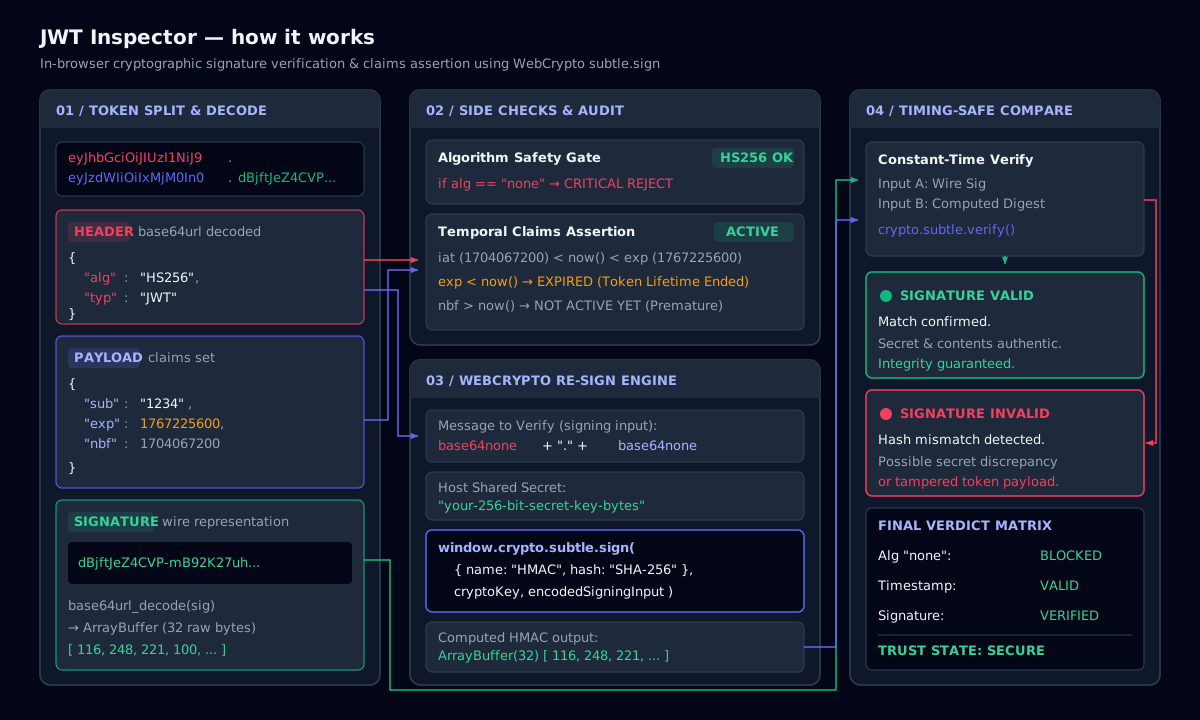
The security checks this inspector runs
Classic JWT vulnerabilities come from servers that trust the token to describe how it should be verified. The audit panel flags them so you can raise them in a review or pentest report.
- alg: none: an unsigned token. Servers must reject it; accepting it is a full authentication bypass.
- Algorithm confusion: an RS256 service that also accepts HS256 can be tricked into using its public key as an HMAC secret.
- Missing or distant exp: tokens without expiry, or valid for months, cannot be contained after theft.
- Sensitive data in the payload: the payload is only encoded, not encrypted; never put passwords or PII in it.
- jwt kid injection: a
kidheader containing paths or SQL (../../dev/null) suggests key-lookup abuse. - Weak HMAC secrets: short or dictionary secrets can be brute-forced offline with hashcat mode 16500.
Verifying an HMAC signature locally
For HS256, HS384 and HS512 tokens, enter the shared secret (as text or Base64) and the inspector imports it with crypto.subtle.importKey and calls crypto.subtle.verify. The secret stays in page memory and is discarded when you clear the form or close the tab.
RS256, ES256 and EdDSA tokens are signed with a private key and verified with the public key, usually fetched from the issuer’s JWKS endpoint (/.well-known/jwks.json). Decoding still works for them; compare the kid with the issuer’s JWKS to confirm which key signed the token.
Decoding bearer tokens in practice
To decode a bearer token, copy the value after Bearer in the Authorization header from your browser’s network tab or proxy. The bearer token decoder strips the prefix automatically. OAuth 2.0 access tokens from Azure AD (Entra ID), Auth0, Okta, Cognito and Keycloak are usually JWTs; opaque tokens that are not three dot-separated segments can only be checked against the issuer’s introspection endpoint.
Common JWT interview questions start here: why a JWT cannot be revoked without extra state, why short-lived access tokens are paired with refresh tokens, and why tokens belong in HttpOnly cookies rather than localStorage when XSS is a concern.
JWT claims and algorithms cheat sheet
| Field | Location | Meaning |
|---|---|---|
| alg | Header | Signing algorithm: HS256, RS256, ES256, EdDSA, none |
| kid | Header | Key ID used to pick the verification key |
| typ | Header | Token type, usually JWT or at+jwt |
| iss | Payload | Issuer: who created and signed the token |
| sub | Payload | Subject: the user or client the token is about |
| aud | Payload | Audience: the API that must accept it |
| exp | Payload | Expiry, seconds since the Unix epoch |
| nbf | Payload | Not valid before this time |
| iat | Payload | Issued-at time |
| jti | Payload | Unique token ID, used for replay detection |
Registered claims and the signing algorithms you will see most.
Command-line examples
Decode a JWT payload in the shell
cut -d. -f2 <<< "$JWT" | tr "_-" "/+" | base64 -d 2>/dev/null | jq .jsonwebtoken decode in Node.js (no verification)
node -e "console.log(require('jsonwebtoken').decode(process.argv[1], {complete:true}))" "$JWT"Verify with PyJWT
python -c "import jwt,sys; print(jwt.decode(sys.argv[1], sys.argv[2], algorithms=['HS256']))" "$JWT" "$SECRET"Frequently asked questions
It means the current time is past the token’s exp claim, so the server rejects it. The client must obtain a new token, normally by using a refresh token or signing in again. A small clock skew allowance (often 30–60 seconds) is common.
Related tools
- Log DeobfuscatorDecode Base64, PowerShell, hex, URL and gzip with auto-detect, plus text-to-binary, dec-to-hex and an ASCII table.
- JSON ⇄ YAML Policy ConverterConvert between JSON and YAML and lint AWS IAM policies and Kubernetes securityContext.
- IOC ExtractorExtract and defang indicators of compromise from reports and logs, then export CSV or JSON.