
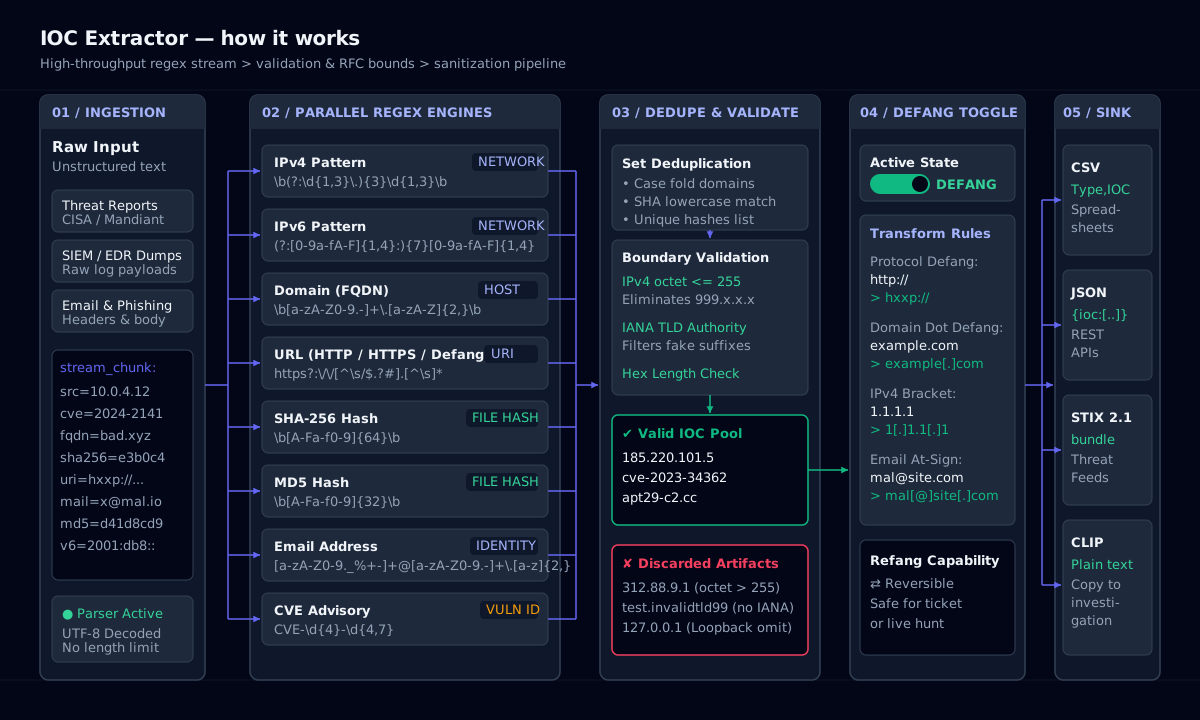
Paste a threat report, alert, email or raw log and this IOC extractor pulls out every indicator of compromise: IPv4 and IPv6 addresses, domains, URLs, SHA-256 and MD5 hashes, email addresses and CVE IDs. It handles defanged input such as hxxp://evil[.]com, deduplicates and validates matches, lets you defang or refang the results in one click, and exports CSV or JSON. Reports often contain unpublished intelligence, so extraction runs entirely in your browser.
Indicators of compromise in cybersecurity
Indicators of compromise (IOCs) are forensic artefacts that show a system may have been breached: an IP address that served malware, a domain used for command and control, the hash of a dropper, a phishing sender. In IOC cybersecurity work, analysts share IOCs in reports, STIX bundles and MISP events so other teams can search their logs and block the same infrastructure.
IOCs are reactive and short-lived: attackers change IPs and domains cheaply. Hashes are precise but break with a one-byte change. Treat a match as a lead to investigate, and age out network indicators after a few weeks unless they are re-observed.
How it works: IOC Extractor
Indicators of attack versus IOCs
Indicators of attack (IOAs) describe behaviour rather than artefacts: an Office process spawning PowerShell, credential dumping from LSASS, a burst of failed logins followed by a success. IOAs survive infrastructure changes because they target what the attacker must do, not what they used.
A mature IOC security programme uses both: IOCs for fast blocking and retro-hunting, IOAs for detection rules that catch the next campaign. The KQL & SPL Query Builder on this site turns extracted IOCs into hunting queries for Sentinel and Splunk.
How the extraction rules work
Each category uses a tuned regular expression, followed by validation that removes false positives. The IP address regex accepts only octets from 0 to 255, so version numbers like 10.2.300.4 are discarded. Domains must end in a plausible top-level domain, so file names like invoice.pdf and config.json are not reported as hosts. Hash patterns require word boundaries and exact lengths: 32 hex digits for MD5, 64 for SHA-256.
Before matching, the text is refanged internally: [.], (.), [dot], hxxp, [:] and [@] are normalised so defanged reports extract cleanly. Results are deduplicated case-insensitively for domains and hashes.
- IPv4 regex used:
\b(?:(?:25[0-5]|2[0-4]\d|1?\d?\d)\.){3}(?:25[0-5]|2[0-4]\d|1?\d?\d)\b. - CVE IDs follow
CVE-YYYY-NNNNwith four or more digits in the sequence number. - Private and reserved IPs are tagged so you can drop internal addresses before sharing.
Defang URLs before you share them
Defanging makes an indicator non-clickable and non-resolvable: https://evil.example/payload becomes hxxps://evil[.]example/payload. Defang every URL, domain and IP before pasting into tickets, chat or email; mail clients and chat apps auto-link and pre-fetch URLs, which can alert the attacker or infect a reader. Refang only inside tools that need the live value, such as a blocklist import.
Exports keep the category of every indicator. CSV output has type,value rows that import cleanly into spreadsheets, firewall object lists and EDR custom-indicator uploads. JSON output groups values by type, which suits scripts, SOAR playbooks and threat-intelligence platforms. Both exports respect the defang toggle, so you can produce a safe copy for a report and a live copy for a blocklist from the same extraction.
IOC types cheat sheet
| Type | Example | Where to search |
|---|---|---|
| IPv4 | 185.220.101.5 | Firewall, proxy, VPN and NetFlow logs |
| IPv6 | 2001:db8::bad:1 | Firewall and DNS logs |
| Domain | update-check[.]example | DNS, proxy and email logs |
| URL | hxxps://cdn[.]example/a[.]ps1 | Proxy, EDR and email URL logs |
| SHA-256 | e3b0c442…b855 (64 hex) | EDR file events, VirusTotal |
| MD5 | d41d8cd98f00b204e9800998ecf8427e | Legacy AV and EDR |
| billing[@]invoice-portal[.]example | Mail gateway and message trace | |
| CVE | CVE-2024-3400 | Vulnerability scanner results |
Indicator types, an example of each, and where to hunt for them.
Command-line examples
Grep IPv4 addresses from a log
grep -oE "\b([0-9]{1,3}\.){3}[0-9]{1,3}\b" access.log | sort -uHash a suspicious file
sha256sum sample.bin # Windows: Get-FileHash sample.bin -Algorithm SHA256Check a domain in passive DNS-style lookups
dig +short suspicious.example A && whois suspicious.example | grep -i creatFrequently asked questions
IOC stands for indicator of compromise: a piece of forensic evidence, such as a malicious IP address, domain, URL or file hash, that suggests a system or network has been breached.
Related tools
- Log DeobfuscatorDecode Base64, PowerShell, hex, URL and gzip with auto-detect, plus text-to-binary, dec-to-hex and an ASCII table.
- KQL & SPL Query BuilderBuild Sentinel KQL and Splunk SPL from visual filters, with 25 SOC hunting presets.
- CIDR Subnet SplitterNetwork, broadcast, host range and wildcard for any IPv4 block, with one-click split and merge.
Related Engineering Guides
- Networking · 7 min readPrivate IP Ranges (RFC 1918) and Subnet Mask to CIDR: A Practical GuideThe three RFC 1918 blocks, why 255.255.255.0 is a /24, and how to size and split /16, /22, /23 and /24 networks without overlaps.Read the guide
- Vulnerability management · 6 min readCVSS 4.0 Score Calculator vs CVSS 3.1: What Changed in Vulnerability ScoringCVSS 3.1 vs 4.0 side by side: what was added, what was removed, how the 4.0 score is calculated and how to score a CVE in practice.Read the guide
- Security operations · 6 min readAn Offline SecOps Workflow: Log De-obfuscation, IOC Defanging, KQL Hunting and DMARCFollow one phishing-to-PowerShell alert from decoding to DMARC hardening, using browser-only tools so evidence never leaves your machine.Read the guide