Networking
Private IP Ranges (RFC 1918) and Subnet Mask to CIDR: A Practical Guide
The three RFC 1918 private IP ranges, how to convert any subnet mask to CIDR (255.255.255.0 is /24), and worked /16, /22, /23 and /24 subnet split examples.
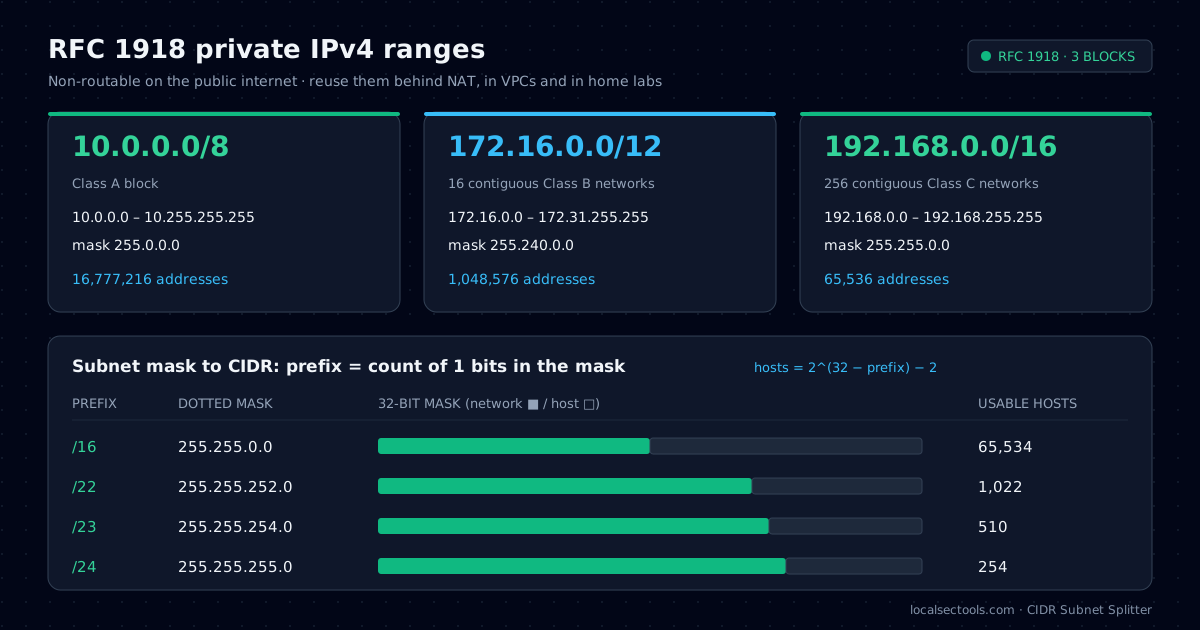
Private IP ranges are the IPv4 blocks that RFC 1918 sets aside for internal networks: 10.0.0.0/8, 172.16.0.0/12 and 192.168.0.0/16. Every home router, office LAN and cloud VPC is built from them. This guide explains those ranges, shows how to turn any subnet mask into CIDR notation, and walks through the /16, /22, /23 and /24 sizes that come up most often.
I work on a service desk and in a SOC, and subnet questions show up in both jobs. A firewall rule with the wrong mask, or a VPN pool that overlaps a home network, causes outages that look like application bugs. You can check every number below in the CIDR Subnet Splitter, which runs entirely in your browser.
What are the private IP ranges?
RFC 1918 reserves three IPv4 blocks for private use: 10.0.0.0/8, 172.16.0.0/12 and 192.168.0.0/16. Internet routers drop them, so any organization can reuse them behind NAT.
| Block | First – last address | Subnet mask | Addresses |
|---|---|---|---|
| 10.0.0.0/8 | 10.0.0.0 – 10.255.255.255 | 255.0.0.0 | 16,777,216 |
| 172.16.0.0/12 | 172.16.0.0 – 172.31.255.255 | 255.240.0.0 | 1,048,576 |
| 192.168.0.0/16 | 192.168.0.0 – 192.168.255.255 | 255.255.0.0 | 65,536 |
The middle block catches people out. 172.16.0.0/12 stops at 172.31.255.255, so 172.32.0.1 is a public address. When I review firewall rules, a hand-typed 172.0.0.0/8 "private" rule is one of the most common mistakes I find.
A few other ranges are not RFC 1918 but behave like private space. Treat them separately in allow lists and threat-intel lookups.
100.64.0.0/10is carrier-grade NAT space (RFC 6598). Mobile carriers and some ISPs use it between the customer and the internet.169.254.0.0/16is link-local (RFC 3927). A Windows host that shows169.254.x.xfailed to reach a DHCP server.127.0.0.0/8is loopback. Traffic to it never leaves the host.
When you triage an alert, a private source address means the activity came from inside your network or through a VPN. Defang and enrich only the public indicators with the IOC Extractor.
How do you convert a subnet mask to CIDR notation?
Count the 1 bits in the subnet mask. That count is the CIDR prefix, so 255.255.255.0 has 24 one-bits and equals /24.
A subnet mask is 32 bits long. Network bits are 1 and host bits are 0, and the ones are always contiguous from the left. Each 255 octet adds 8 bits. The partial octet adds the number of bits shown in the table below.
prefix = 8 × (number of 255 octets) + bits(partial octet) e.g. 255.255.252.0 = 8 × 2 + 6 = /22
| Octet value | Binary | Bits added | Example mask |
|---|---|---|---|
| 128 | 10000000 | 1 | 255.255.255.128 = /25 |
| 192 | 11000000 | 2 | 255.255.255.192 = /26 |
| 224 | 11100000 | 3 | 255.255.255.224 = /27 |
| 240 | 11110000 | 4 | 255.255.240.0 = /20 |
| 248 | 11111000 | 5 | 255.255.248.0 = /21 |
| 252 | 11111100 | 6 | 255.255.252.0 = /22 |
| 254 | 11111110 | 7 | 255.255.254.0 = /23 |
| 255 | 11111111 | 8 | 255.255.255.0 = /24 |
The reverse is just as quick. Write the prefix as full octets of 255, then convert the remainder with the table. For /23 that is two full octets, then 7 bits, which gives 255.255.254.0.
python3 -c "import ipaddress; print(ipaddress.ip_network('0.0.0.0/255.255.252.0').prefixlen)"
# 22
python3 -c "import ipaddress; print(ipaddress.ip_network('0.0.0.0/23').netmask)"
# 255.255.254.0
Why is 255.255.255.0 a /24 (netmask 24)?
255.255.255.0 has three full octets of ones, which is 24 network bits, so it is written /24. It leaves 8 host bits: 256 addresses and 254 usable hosts.
A /24 is the default LAN size on most routers. In 192.168.1.0/24, the network address is 192.168.1.0 and the broadcast address is 192.168.1.255. Hosts use .1 through .254.
When someone asks for "subnet mask 24" or "netmask 24", they mean this layout. Open the /24 preset to see the bit lane, the wildcard mask 0.0.0.255 and the host range for any address you type.
usable hosts = 2^(32 − prefix) − 2 → 2^8 − 2 = 254
What is a /16 subnet mask?
A /16 uses the subnet mask 255.255.0.0. It contains 65,536 addresses and 65,534 usable hosts, and it is the largest VPC you can create in AWS.
People search for "16 subnet mask" and "cidr /16" when they plan a cloud network or a site summary route. A /16 such as 10.20.0.0/16 holds 256 separate /24 networks, so it works well as one region or one site.
Do not put 65,000 hosts in one broadcast domain. Use the /16 as an address plan and split it into smaller subnets. The /16 preset shows the split into /17 through /24 children.
What are the /22 and /23 netmasks?
A /22 uses 255.255.252.0 and holds 1,022 usable hosts. A /23 uses 255.255.254.0 and holds 510 usable hosts.
| Prefix | Subnet mask | Wildcard | Addresses | Usable hosts |
|---|---|---|---|---|
| /16 | 255.255.0.0 | 0.0.255.255 | 65,536 | 65,534 |
| /22 | 255.255.252.0 | 0.0.3.255 | 1,024 | 1,022 |
| /23 | 255.255.254.0 | 0.0.1.255 | 512 | 510 |
| /24 | 255.255.255.0 | 0.0.0.255 | 256 | 254 |
A /22 is four /24 networks joined together, and a /23 is two. That makes them popular for guest Wi-Fi and large user VLANs that outgrow 254 addresses.
Alignment rules for /22 and /23
A subnet must start on a multiple of its own block size. A /22 spans 4 values in the third octet, so it must start at 0, 4, 8, 12 and so on. 10.0.4.0/22 is valid and covers 10.0.4.0 to 10.0.7.255. 10.0.6.0/22 is not a valid network address.
A /23 spans 2 values, so its third octet must be even. 172.16.10.0/23 covers 172.16.10.0 to 172.16.11.255. If a colleague asks for the "subnet for /22" of a given IP, mask the third octet down to the nearest multiple of 4.
How do you split a subnet into smaller networks?
Borrow host bits for the network. Each borrowed bit doubles the number of subnets and halves the size of each one.
Say you own 10.20.0.0/22 and need four equal networks. Four is 2², so you borrow 2 bits and the prefix grows from /22 to /24.
| Subnet | Network | Usable range | Broadcast |
|---|---|---|---|
| 10.20.0.0/24 | 10.20.0.0 | 10.20.0.1 – 10.20.0.254 | 10.20.0.255 |
| 10.20.1.0/24 | 10.20.1.0 | 10.20.1.1 – 10.20.1.254 | 10.20.1.255 |
| 10.20.2.0/24 | 10.20.2.0 | 10.20.2.1 – 10.20.2.254 | 10.20.2.255 |
| 10.20.3.0/24 | 10.20.3.0 | 10.20.3.1 – 10.20.3.254 | 10.20.3.255 |
subnets = 2^(new prefix − old prefix) → 2^(24 − 22) = 4
Cloud platforms take a few addresses from every subnet. AWS and Azure both reserve 5 per subnet, so a /24 gives you 251 usable addresses there, not 254. Plan with that number when you size node pools.
The CIDR Subnet Splitter does the split with one click and shows each child range, so you can paste the table straight into a design document.
How should you choose a private range for a new network?
Use 10.0.0.0/8 for cloud and corporate networks, keep 192.168.0.0/16 for small sites, and never reuse a range that a VPN client might already have at home.
- Avoid
192.168.0.0/24and192.168.1.0/24for anything a remote user reaches over VPN. Their home router almost certainly uses one of them, and the routes will clash. - Give each region or site its own /16 from
10.0.0.0/8. Summarizing one /16 per site keeps route tables short. - Leave at least half of every block unused. Growth always arrives faster than the plan expects.
- Record each allocation with its prefix, mask, gateway and owner. Hunting queries are easier to write when the plan is documented; see the KQL & SPL builder for subnet-filter examples.
A short, written plan prevents most overlap incidents. The math takes seconds once you know that the prefix is simply the count of one-bits.
How can you check whether an IP address is private?
Compare it with the three RFC 1918 blocks, or use a library such as Python ipaddress. Remember that library "private" checks also include loopback, link-local and other reserved ranges.
python3 - <<'EOF'
import ipaddress
rfc1918 = [ipaddress.ip_network(n) for n in ("10.0.0.0/8", "172.16.0.0/12", "192.168.0.0/16")]
for ip in ("172.31.4.20", "172.32.0.1", "100.64.1.1"):
    addr = ipaddress.ip_address(ip)
    print(ip, any(addr in n for n in rfc1918), addr.is_private)
EOF
# 172.31.4.20 True True
# 172.32.0.1 False False
# 100.64.1.1 False False
The explicit list is clearer in a security context, because it matches exactly what RFC 1918 says. Use it in log enrichment and alert rules so CGNAT and link-local traffic get their own labels.
Frequently asked questions
RFC 1918 defines 10.0.0.0/8 (10.0.0.0 to 10.255.255.255), 172.16.0.0/12 (172.16.0.0 to 172.31.255.255) and 192.168.0.0/16 (192.168.0.0 to 192.168.255.255).
Try it in your browser
- CIDR Subnet SplitterNetwork, broadcast, host range and wildcard for any IPv4 block, with one-click split and merge.
- IOC ExtractorExtract and defang indicators of compromise from reports and logs, then export CSV or JSON.
- KQL & SPL Query BuilderBuild Sentinel KQL and Splunk SPL from visual filters, with 25 SOC hunting presets.
About the author: Asad Ali
IT Support Engineer and SOC analyst · Microsoft SC-200 & ISC2 CC certified
Asad Ali is an IT Support Engineer and SOC analyst with a Computer Science degree from UET Lahore. He holds the Microsoft SC-200 Security Operations Analyst and ISC2 Certified in Cybersecurity (CC) certifications, works on threat detection, network analysis and Linux administration, and builds and maintains every tool on LocalSecTools.
- Microsoft Certified: Security Operations Analyst (SC-200)
- ISC2 Certified in Cybersecurity (CC)
Every guide is written and technically reviewed by Asad Ali, and the commands and numbers are checked against the LocalSecTools calculators. Read more about his work at asadali.tech.